Do Macs get viruses? What Apple stops and what it misses
Do Macs get viruses? Yes. See what XProtect and Gatekeeper stop, how Mac stealers still get in, and whether you need antivirus on a Mac.
Do Macs get viruses? Yes. Macs get malware, and in 2025 the most common new kind on the Mac was the information stealer, a program that copies your saved passwords, cookies and crypto wallets. Objective-See, which has reviewed every new piece of Mac malware each year for a decade, wrote that "the most common type of new macOS malware observed in 2025 was, without a doubt, information stealers". Huntress, quoting it, puts the share above 65%.
The word "virus" is loose here. What reaches a Mac today is almost never a virus in the old sense. It is a fake: a program that looks like something you wanted and quietly takes your passwords, cookies and wallets. That is also why the question "do I need antivirus on a Mac" has a more useful answer than yes or no, and the rest of this guide gives it.
Do Macs really get viruses? Mac malware in 2026
Mac malware is real, current and sold as a service: criminals rent the same stealers to many affiliates, who spread them with fake installers and fake "fix it" pages. These are the Mac cases published since February 2026, each from the researchers who found it.
- February 2026, Microsoft. Three Mac stealers in one report: DigitStealer behind a fake app installer, MacSync delivered by a command pasted into Terminal, and Atomic macOS Stealer (AMOS) behind fake AI tool installers. Many people met them through Google ads.
- January to April 2026, Microsoft (report of May 6). Pages posing as help for Mac problems, hosted even on Medium and Squarespace, told people to paste a command into Terminal. Afterwards the stealer asked for the Mac password, "pretending to install a helper", and set itself up to start again, posing as a software update component.
- May 2026, SANS. A paid Google ad for Homebrew, a popular Mac tool, led to a copy of its site that served the MacSync stealer.
- June 2026, Huntress. Fake disk images whose background picture tells you to right-click and override Gatekeeper, or to "Drag to Terminal". Pirated copies labelled "CRACKED" explain the warning away by saying the real version "can't be notarized".
- June 2026, Unit 42 (via BleepingComputer). A fake human check tells you to paste a Terminal command that downloads a disk image, mounts it out of sight and launches AMOS.
- July 2026, Malwarebytes. ClickLock: a fake Cloudflare check, then a fake macOS password box using your real username, then your Mac is kept unusable for up to 83 hours or until you type the password.
AMOS alone accounted for almost 40% of Sophos's macOS protection updates in 2025, more than double any other Mac malware family, according to Sophos. For how this family of programs works on any computer, read what is an infostealer.
What do XProtect, Gatekeeper and notarization actually do?
XProtect, Gatekeeper and notarization are three layers of Apple's own protection, and together they stop known malware and unverified software, not software you choose to open anyway. Here is each one, from Apple's documentation.
| Layer | What Apple says it does | What it does not do |
|---|---|---|
| Notarization | Apple's malware scanning service. Developers outside the App Store submit apps, and Apple issues a ticket if it finds no malware. Apple can revoke the ticket of an app later found malicious. | The App Store review and notarization are "designed to ensure that apps contain no known malware": the word is known. |
| Gatekeeper | When you open an app, plug-in or installer from outside the App Store, it checks the software comes from an identified developer, is notarized and has not been altered. It asks your approval the first time you open it. | By Apple's own description you can override it. It checks only files marked as downloaded (more below). |
| XProtect | Detects and blocks known malware with signatures Apple updates regularly (macOS checks daily by default), can remediate infections, and has an engine for unknown malware based on behavior. | A signature scanner is strongest on what Apple has already seen. AV-Comparatives says Apple's approach "handles well-established malware effectively but may not respond quickly enough to emerging threats". |
That is a solid baseline, and most people never see it work because it simply refuses things. The 2026 cases above did not defeat it by force. They avoided it or asked you to switch it off.
Why do these protections not stop Mac malware?
Mac malware gets past Apple's checks mostly because the attack makes you do the risky step yourself, in one of three ways. The first two are below, and the third is the password box in the next section.
You click the override. Gatekeeper blocks unverified software, and Apple documents the way around it for people who really want a certain app: in System Settings, open Privacy & Security, scroll down and click Open Anyway. Huntress's 2026 finding is that criminals print those instructions inside the fake disk image. The protection works, and the attacker's page teaches you to ignore it. If that is the dialog you are staring at, read what to do when macOS cannot verify an app.
You paste the command. Gatekeeper only checks files that carry the "downloaded from the internet" tag, which web browsers add. Palo Alto's Unit 42 notes that command-line tools such as curl do not add it, and that files without the tag are excluded from a Gatekeeper check. A command you paste into Terminal can fetch a program, and macOS will not treat it as a new download. That is the fake human check trick.
Apple has started to answer the paste trick. BleepingComputer reported on March 30, 2026 that macOS Tahoe 26.4 warns you when you paste a command into Terminal that looks like a scam, and lets you cancel. Apple has published no documentation on it, the alert may appear only once per session, and you can still choose to continue. Treat it as a second chance to stop, not as the rule.
For power usersHow to see the "downloaded" tag yourself
The tag is an extended attribute named com.apple.quarantine. xattr -l ~/Downloads/example.dmg lists it: a file saved by a browser has it, a file fetched by curl does not. spctl --assess --type execute -vv /Applications/Example.app asks Gatekeeper whether it would allow an app, and codesign -dv --verbose=4 /Applications/Example.app shows who signed it. These only inspect; they change nothing. An app that is unsigned, or signed by a name you have never heard of, and asks you to get around the warning is the case to walk away from.
What does a Mac infection look like on screen?
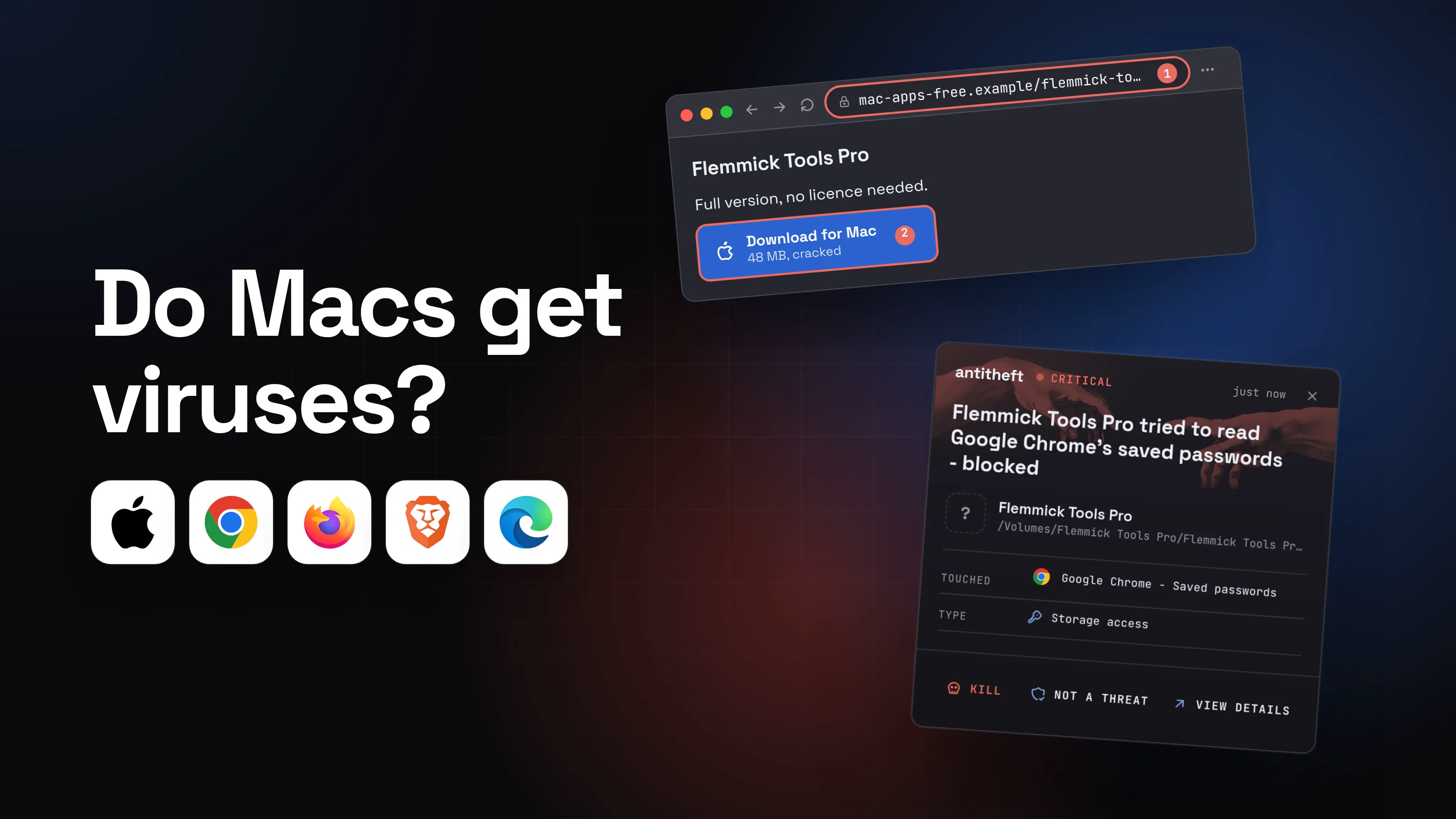
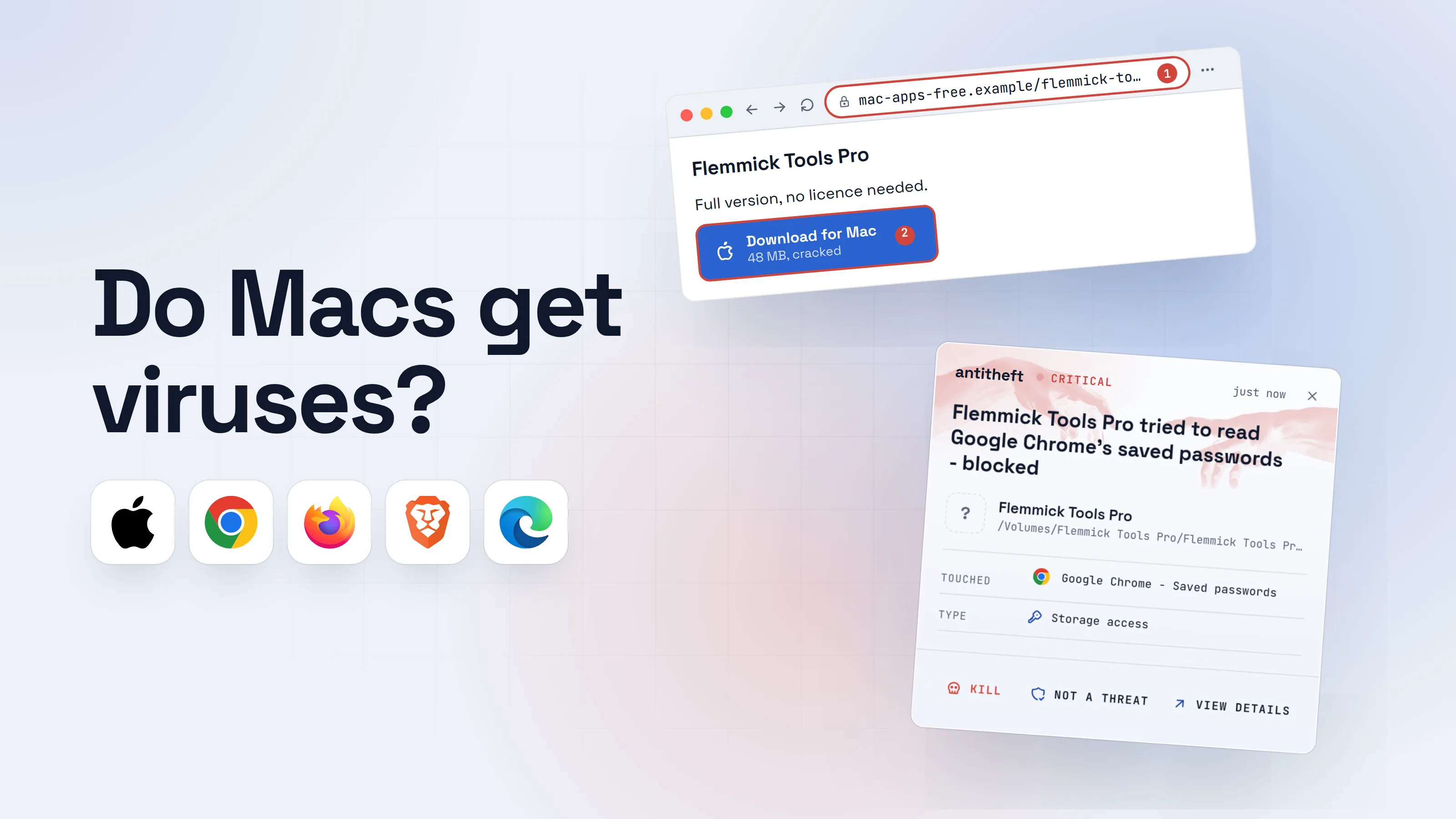
A Mac infection usually looks like you installing a free app and typing your password once. The walkthrough below is built from the 2026 cases above. The app, its maker and every address are made up.
- 1You look for a free copy of an app you would normally pay forCracked software is one of the surest ways onto a Mac. See cracked software and game cheats.
Flemmick Tools Pro
Full version, no licence needed.
Download for Mac48 MB, cracked2- 1A download site, not the maker's own
- 2A paid app offered free is the lure
- 2The disk image tells you how to get past macOSA real Mac app is dragged into Applications and needs no instructions about warnings.Flemmick Tools Pro
- 1Telling you to override the check is the giveaway
- 3The app opens and asks for your Mac passwordIt looks like the Mac asking. It is the program you just opened.
Flemmick Tools Pro wants to make changes.1
Enter your password to allow this.
User NameyouPassword••••••••••2CancelOK- 1A program you just opened wants administrator rights
- 2Typing it hands the program your Mac password
- dangerIt copies your browser passwords, sessions and walletsIt takes seconds. The app may even work, so nothing looks wrong.
What the fake installer takes from you
- Saved browser passwordsEmail, bank, exchange, socials
- Logged-in sessionsAccounts opened without a code
- Your crypto walletsEmptied, with no way to undo it
- Your Mac passwordYou typed it into the prompt yourself
You find out days later, when the money or the accounts are gone.
With antitheft
With antitheft, the stealer is stopped at the browser and wallets
- Caught the moment it reaches for your passwords or wallets
- On Linux refused before the file opens, on Windows and macOS stopped right after
- Even the most advanced malware, the kind no antivirus has seen yet
- Touched
 Google Chrome - Saved passwords
- Type
- Storage access
Keep stealers out of your passwords and wallets
- Guards passwords, browser logins and wallets
- Stops malware your antivirus misses
- On Windows, macOS and Linux
That is the part antitheft adds on a Mac: any program other than the browser itself that touches the browser's saved passwords, logins and session cookies is stopped, and so is anything but the wallet app that touches its wallet files. A stealer nobody has seen before is stopped the same way, whether Apple's scanner knew it or not. The cases in this guide went after exactly those stores.
What does antitheft not stop on a Mac?
The antitheft app does not stop the steps that come before the theft, and it does not cover everything on a Mac. Read this list before you rely on any of it.
| Protected by the antitheft app | Not covered |
|---|---|
| Saved passwords, logins and session cookies of Chrome, Edge, Firefox, Brave, Opera and Vivaldi | Safari. Its stored passwords and cookies are not covered |
| Desktop and browser-extension wallet files, and a wallet app swapped for a fake copy | The macOS Keychain |
| Any program that touches them is stopped, including a stealer nobody has seen before | The Mac password you type into a fake prompt |
| The Terminal command or installer itself: it runs, and antitheft is not an antivirus |
If Safari is your browser, the habits below are your protection, since the antitheft app does not guard its passwords. If you typed your Mac password into a fake prompt, assume the stealer could also open the Keychain: Sophos and Microsoft both list Keychain data among what AMOS and its relatives take.
The other thing a stealer does is stay. Microsoft's May 2026 report describes the Mac stealers starting again through startup entries posing as software update components. A stealer that comes back that way and reaches for your browser passwords or wallets again is stopped again by antitheft. Removing the startup entry is the clean-up below.
Do I need antivirus on a Mac?
You do not strictly need antivirus on a Mac, but it is a reasonable extra if you often try new software, share the Mac with children, or find fake installers hard to spot. The Mac already has XProtect, which is a malware scanner, and Gatekeeper in front of it.
The independent evidence points the same way. In its June 2026 Mac test, AV-Comparatives scanned 1,500 recent Mac malware samples and the nine products it tested caught between 96.7% and 100% of them, with no false alarms. Its report says non-expert users, children and people who frequently try new software "stand to benefit most" from the extra layer.
Be clear about what that score means. It measures programs the lab already had. A brand-new program that reads your browser passwords is by definition one no scanner has a score for yet, and an attack that talks you into running it yourself does not depend on your scanner at all. That gap is why antitheft sits next to antivirus on a Mac instead of replacing it: it does not scan or remove anything, it stops any program that reaches for the passwords and wallets.
How do I stay safe on a Mac?
The safest Mac habits are the ones that never give an attacker the one step they need: you running something. Do these in order, and keep the list.
- Install from the App Store, or from the maker's own site that you typed or bookmarked. A search ad is not the official site. See fake ads for real apps.
- Treat any instruction to get around a macOS warning as the attack. Use Open Anyway in System Settings > Privacy & Security only for an app you chose and trust, never because a page or a disk image told you to.
- Never paste a command into Terminal because a web page said so. No real human check, error page or "fix" needs it.
- Type your Mac password only when you started something that needs it. A password box that appears right after you open a downloaded app is the thing to refuse.
- Skip cracked apps. Their instructions include the warning-bypass steps above. See cracked software and game cheats.
- Update macOS. Apple's malware protection updates arrive automatically, and macOS checks for them daily by default.
- Use a different password on every account and turn on two-factor authentication, so one stolen password opens one door.
- Check the "update" prompts too. Fake updates are a classic lure on the Mac as well: fake browser updates.
What if my Mac may already be infected?
If you opened something you now doubt, act as if your passwords are known and change them from a different device. The order matters.
- Disconnect the Mac from the internet and use your phone or another computer for the next steps.
- Change passwords in this order: email first, then banks and exchanges, then your Apple Account and the rest. If you typed your Mac password into a prompt, assume Keychain contents are exposed and change those too.
- Sign out every session on the important accounts so stolen login cookies stop working. See session cookie theft.
- Move crypto to a new wallet from a clean device if a wallet was on this Mac.
- Erase and reinstall macOS. It is the one step after which you know what is on the Mac. Then change your passwords from a clean device: what to do if your passwords were stolen.
Full details on the passwords are in what to do if your passwords were stolen. The app does not clean a Mac. After the clean-up, antitheft stops any program that is not their owner the moment it touches passwords and wallets again.
So, do Macs get viruses?
Yes, and the recent ones all have one thing in common: they work because a person gets talked into opening, overriding or pasting something. Apple's protection is real and stops a great deal. Your habits cover the rest, an antivirus is an optional extra, and for the browser passwords and wallets a stealer is really after, antitheft stops anyone but their owner who touches them, on Chrome, Edge, Firefox, Brave, Opera and Vivaldi. On Safari the habits above are what you have.
Questions people ask
Can a Mac get a virus?
Yes. A Mac can get malware, and the most common kind in 2025 was the password stealer, according to Objective-See's yearly review of new macOS malware. In 2026, Microsoft, Huntress, Unit 42 and Malwarebytes each described a different Mac campaign. They all depend on you installing something or pasting a command, not on a flaw in macOS.
Do I need antivirus on a Mac?
Not strictly, because macOS has its own scanner (XProtect) and checks apps before they open (Gatekeeper). Antivirus is a reasonable extra if you often try new software, share the Mac with children, or are not confident spotting fake installers: AV-Comparatives' June 2026 Mac test says those users benefit most. Antivirus does not replace the habits in this guide.
Does a Mac have built-in antivirus?
Yes. XProtect is Apple's built-in scanner. Apple says it detects and blocks known malware using signatures that macOS checks for daily by default, and that it can remediate infections. It works together with Gatekeeper and Apple's notarization check.
Can a Mac get a virus from visiting a website?
In every campaign described here, the website only tricked the person: it offered a fake download or told them to paste a command in Terminal. Nothing happened until they acted. Keeping macOS updated covers the rest, because Apple's malware protection updates arrive automatically.
Is a Mac safer than a Windows PC?
Stealer families are now built for both. Microsoft's February 2026 report describes infostealers expanding into macOS through fake installers and Terminal commands. The safer computer is the one where you do not run what a web page tells you to run, whatever the logo on the lid.
Can the Mac App Store have malware?
It is much safer than a random download site, but not perfect. In 2026 Kaspersky found 26 fake crypto wallet apps on Apple's App Store. Check the developer name against the one on the official website before you install a wallet or any app that handles money.
Does antitheft protect Safari on a Mac?
No. The antitheft app protects the stored passwords, logins and cookies of Chrome, Edge, Firefox, Brave, Opera and Vivaldi, and desktop and browser-extension wallet files: a program that touches them is stopped. It does not cover Safari or the macOS Keychain, so if Safari is your browser the habits in this guide are your protection.
the short version
Yes, Macs get malware, and the common kind steals your passwords. Apple's built-in protection (Gatekeeper, notarization, XProtect) stops known malware and unverified apps, but not a program you are talked into opening or a command you paste into Terminal yourself. Antivirus is optional on a Mac and useful if you often try new software. The habits below matter more, and antitheft stops a stealer that reaches for your browser passwords and wallets, even when it gets in.
sources
- Apple Platform Security: Protecting against malware in macOS (Gatekeeper, notarization, XProtect)
- Apple Platform Security: Gatekeeper and runtime protection in macOS
- Apple Support: Safely open apps on your Mac
- Microsoft Security: ClickFix campaign uses fake macOS utilities lures to deliver infostealers (May 2026)
- Microsoft Security: Infostealers without borders, macOS, Python stealers and platform abuse (Feb 2026)
- Huntress: Deceptive installers, how fake apps target macOS (Jun 2026)
- Objective-See: The Mac Malware of 2025 (Jan 2026)
- Sophos: Why AMOS matters, the macOS malware stealing data at scale (Apr 2026)
- BleepingComputer: New macOS ClickFix attack silently mounts DMGs to push infostealer (Unit 42 finding) (Jun 2026)
- Malwarebytes: New ClickLock Stealer locks your Mac until you hand over your password (Jul 2026)
- SANS Internet Storm Center: Malicious ad for Homebrew leads to MacSync stealer (May 2026)
- BleepingComputer: Apple adds macOS Terminal warning to block ClickFix attacks (Mar 2026)
- AV-Comparatives: Mac Security Test and Review 2026 (Jun 2026)
- Palo Alto Networks Unit 42: Gatekeeper bypass, uncovering weaknesses in a macOS security mechanism (quarantine attribute)
- Kaspersky: 26 fake crypto wallet apps found on Apple's App Store (Apr 2026)