Fake ads for real apps: how to spot a poisoned download
Fake ads for real apps put a perfect copy of the site at the top of your search, with a stealer inside. Spot the three giveaways and download safely.
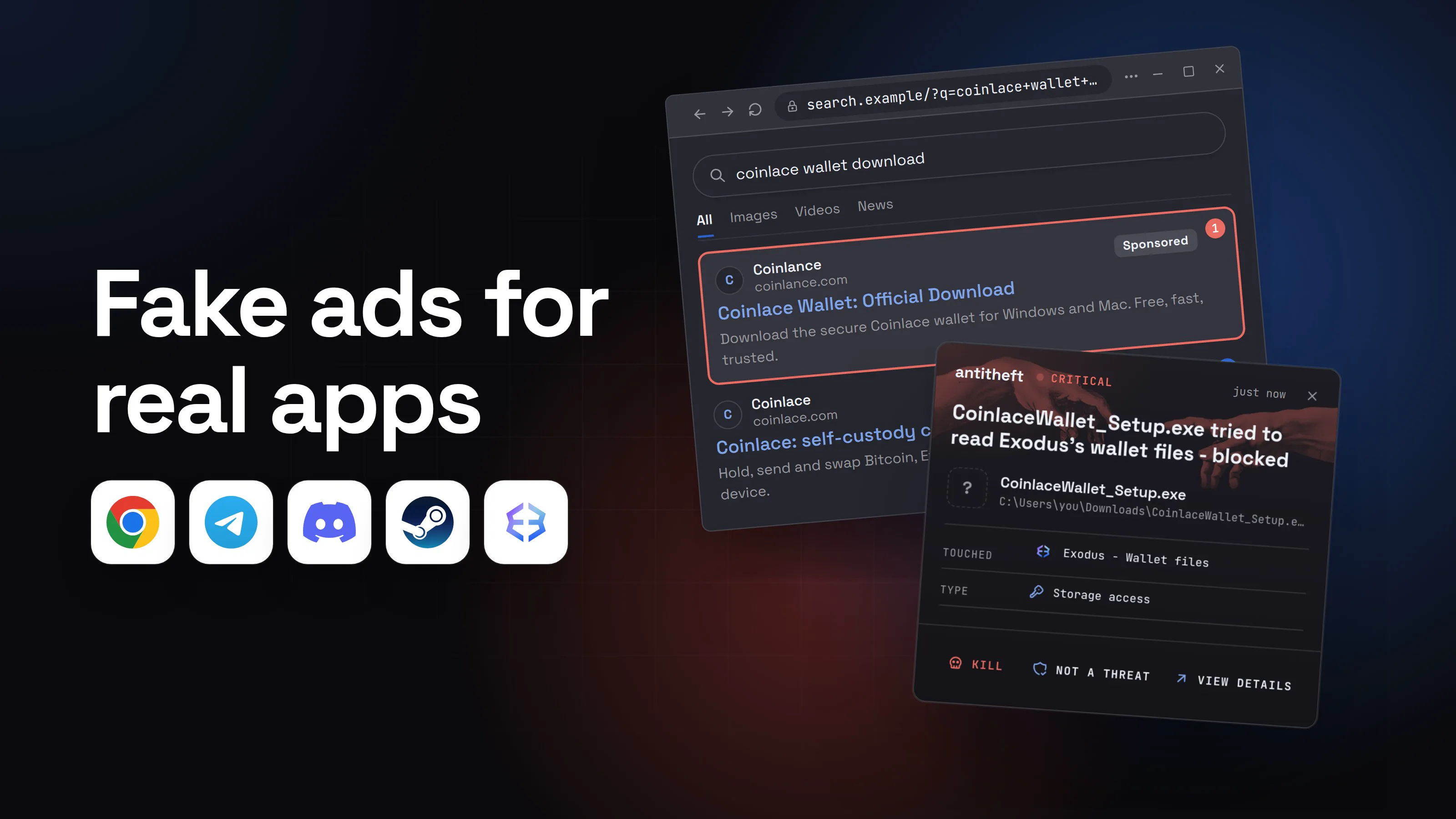
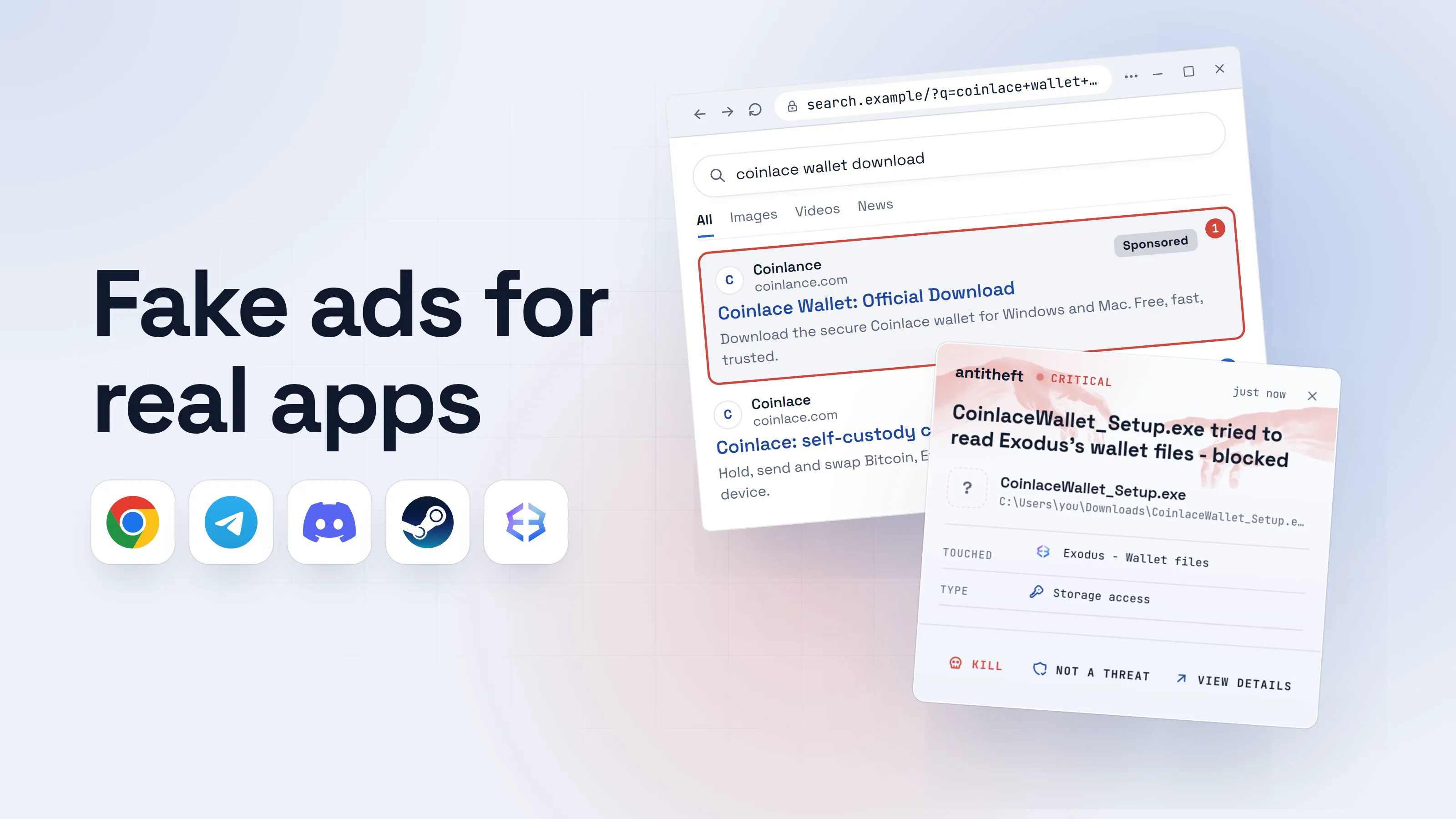
You search for a free program you have heard of: a browser, a PDF reader, a password manager, a video player, a crypto wallet. The first result says Sponsored, shows the right name and the right logo, and leads to a site that looks exactly like the real one. These fake ads for real apps are called malvertising, and they are one of the most common ways stealers reach ordinary people.
Nothing about it feels like a scam. You did what everyone does: searched, clicked the top result, installed. That is exactly why it works.
This guide shows what a fake ad looks like, the three giveaways that expose it, and a download routine that makes you immune to it. Technical details for power users are in boxes you can skip.
How fake ads for real apps catch you
Here is the whole trick, step by step, the way it really looks. The brand is made up; the method is not.
- 1You search for the app and click the top resultThe ad sits above the real site, with the right name and logo.coinlace wallet downloadAllImagesVideosNewsCoinlancecoinlance.comSponsored1Coinlace Wallet: Official DownloadDownload the secure Coinlace wallet for Windows and Mac. Free, fast, trusted.Coinlacecoinlace.com2Coinlace: self-custody crypto walletHold, send and swap Bitcoin, Ethereum and more. Your keys never leave your device.
- 1A paid ad, and one extra letter: coinlance, not coinlace. Anyone can buy this spot
- 2The real site, right underneath the ad
- 2A perfect copy of the real site offers the downloadSame logo, same colours, same text. Only the address is different.CoinlaceWalletSwapSupport
Coinlace Wallet
Your keys, your crypto. Now with instant swaps.
Download for WindowsVersion 4.2.1 · Windows 10+2Download for MacmacOS 13+- 1The address bar is the one thing a copy cannot fake
- 2Hovering may even show the real address. The click goes somewhere else
- 3You open the installer you just downloadedThis is the last moment to stop. Look at what your computer tells you.User Account Control
Do you want to allow this app from an unknown publisher to make changes to your device?
CoinlaceWallet_Setup.exePublisher: Unknown1File origin: Hard drive on this computerShow more detailsYesNo- 1Real wallet installers are signed by the company that makes them, and the prompt turns grey
Coinlace WalletInstall Coinlace Wallet
Drag this icon into Terminal to install.
CCoinlace InstallerTerminal1- 1A real Mac app is dragged into Applications, never into Terminal
- 4It installs like normal, or asks for your passwordA real-looking app may even open. Nothing seems wrong.Coinlace Wallet SetupCVersion 4.2.1
Completing the Coinlace Wallet Setup
Coinlace Wallet has been installed on your computer.
Launch Coinlace WalletBackFinish1- 1The app really installs. The stealer runs alongside it
Coinlace WalletOKCancel- 1Not macOS asking: the stealer wants your Mac password to open more of your saved secrets
- dangerBehind the app, it copies your passwords and walletsIt takes seconds, and it happens while you look at the app you wanted.
What the fake installer takes from you
- Every saved passwordEmail, bank, exchange, socials
- Your logged-in sessionsAccounts opened within minutes, no 2FA code needed
- Your crypto walletsEmptied, with no way to undo it
- Discord, Telegram, SteamResold, or used to fool your friends
The app you wanted works fine. That is why nobody notices.
With antitheft
With antitheft, the stealer is stopped at your passwords
- Caught the moment it reaches for your passwords or wallets
- On Linux refused before the file opens, on Windows and macOS stopped right after
- Even the most advanced malware, the kind no antivirus has seen yet
- Touched
 Exodus - Wallet files
- Type
- Storage access
- Touched
- Exodus - Wallet files
- Type
- Storage access
Keep stealers out of your passwords and wallets
- Guards passwords, browser logins and wallets
- Stops malware your antivirus misses
- On Windows, macOS and Linux
None of this is invented. In April 2026, Malwarebytes described a copy of a real coding app's site on a hyphenated lookalike address. Its installer carried the genuine app plus a stealer, and the app worked normally. In May 2026, the SANS Internet Storm Center documented a paid Google ad for Homebrew, a popular Mac tool, that led to a copy of its site serving a Mac stealer that asked for the victim's password.
Why the top result can be a trap
A search ad is a paid placement. The advertiser picks the words it appears for, the title, and the address printed under it. Search engines check ads, and they block a lot: Google says it removed 602 million scam ads and suspended 4 million scam-linked advertiser accounts in 2025 alone. Some still get through, and a fake ad only needs to run for a few hours to catch people.
The ad also lands exactly where trust is highest. Above the real site, with the real name, at the moment you have already decided to install something.
For power usersWhy the address in an ad can lie
The address printed under a search ad is display text. The click itself goes through ad tracking links and redirects before you land anywhere, so the final page can be a different domain from the one the ad showed. That is what SANS saw in the Homebrew case. Fake download pages also play the same trick on their buttons: Malwarebytes found 41 sites whose Download button showed a real address on hover, while a script sent the click somewhere else. Only the address bar after the page has loaded tells you where you really are.
How to spot a fake download ad
You do not need to be technical. Three checks catch almost every fake:
- The Sponsored label. For a download, treat any ad as a reason to scroll down to the real result instead.
- The address. One letter off (coinlance), an extra word (coinlace-download, get-coinlace), a hyphen, or an odd ending (.app, .top, .site, .pro) where the real one is plain. Read it letter by letter.
- The age of the site. Fake sites are cheap to set up and get taken down, so they tend to be new. A wallet or browser that has existed for years does not live on a domain registered last week.
A few more signs that should make you close the tab:
- The page asks you to install a "download manager" before the real app.
- A Mac installer tells you to drag something into Terminal, right-click to get around a warning, or paste a command.
- Windows says the publisher is Unknown for an app made by a well-known company.
For power usersCheck a domain's age and an installer's signature
Look up any domain at ICANN Lookup: the creation date is near the top. A few days or weeks old is a strong warning for anything that claims to be an established product. On Windows, right-click the installer, choose Properties, then the Digital Signatures tab: the signer should be the company you expect, and no tab at all means unsigned. On a Mac, codesign -dv --verbose=4 /path/to/App.app prints the signing team, and spctl -a -vv /path/to/App.app tells you whether Gatekeeper accepts it.
How to download apps safely, every time
Make this your routine and fake ads stop mattering:
- Type the address yourself, or use a bookmark. If you do not know the official address, find it on the app's page on Wikipedia or ask someone who uses it. Bookmark it once.
- Use your system's app store when the app is there. Microsoft Store, Mac App Store, or your Linux software center. Check that the developer name matches the company on the official site.
- Check the address bar before you click Download, not the search result and not the button.
- Read what your computer tells you when the installer opens. "Unknown publisher" on Windows, or any request to use Terminal on a Mac, means stop and delete the file.
- Never type your Mac password into an installer you just downloaded unless you are sure it is the real app from the real site.
- For crypto wallets, only follow links from the wallet's own website, and never type your seed phrase into anything except the wallet device you set it up on.
Why crypto wallet apps are a favourite fake
Every stealer grabs crypto wallets, because they are the fastest way to turn a stolen computer into money. And a fake wallet app sits right next to the coins.
Source: Chainalysis, Dec 2025
Wallet makers are copied in app stores too: in April 2026, Kaspersky found 26 fake crypto wallet apps on Apple's App Store posing as seven well-known wallet brands. The store is still the safer choice. Just open the store link from the wallet's official site rather than searching inside the store.
What to do if you already ran a fake installer
If you clicked a Sponsored result and the installer came from an address that was not the real one, assume a stealer ran. Act from a different device, such as your phone:
- Disconnect the computer from the internet.
- Move your crypto first. Create a new wallet with a new seed phrase on a clean device and send your funds there.
- Change your email password first, then banking, exchanges, your password manager and socials.
- Sign out of every session in each account's security settings. This kills stolen logins, even ones protected by two-factor.
- Turn on two-factor authentication wherever it was off.
- Reinstall the computer before you log back into anything on it.
Our guide to what an infostealer is explains what was most likely taken and why each step matters.
Why a lock on your secrets beats spotting every fake
Every fake ad is new, every lookalike domain is fresh, and the installer is rebuilt again and again. Even careful people click the wrong result once.
antitheft does not try to recognise the fake. It protects what the fake is after: only the app that owns your passwords, browser logins, session cookies, wallets and game accounts may open them. When a poisoned installer reaches for your wallet files, it is refused, even if nobody has ever seen that stealer before. It is free for Windows, macOS and Linux.
Questions people ask
Are Sponsored search results safe to click?
Most are real businesses, but anyone can buy that spot, including criminals copying a well-known app. Search engines remove huge numbers of scam ads and some still get through. For downloads, skip the ads entirely and go to the official site by typing its address or using a bookmark.
Is the app store always safe?
It is much safer than a random download site, but not perfect. In 2026 Kaspersky found 26 fake crypto wallet apps on Apple's App Store. Check the developer name under the app, compare it with the one named on the official website, and follow the store link from that website when it offers one.
If the program installed and works, can it still be malware?
Yes. Some poisoned installers carry the genuine app plus a stealer. The app you wanted opens and works normally, while the stealer copies your saved passwords and wallets in the background. A working app proves nothing.
Does an ad blocker protect me from fake download ads?
It hides many search ads, which removes the most common way people land on these copies. It does not protect you from a lookalike site you reach some other way, so still check the address before you download anything.
Do fake download ads target Macs too?
Yes. Recent campaigns bought ads for Mac tools and served disk images (.dmg files) that ask you to drag an icon into Terminal or type your Mac password. A real Mac app is dragged into Applications and never needs either.
the short version
Criminals buy the top "Sponsored" spot when you search for a popular free app, and send you to a perfect copy of its website. The download installs the app you wanted plus a stealer that empties your saved passwords and crypto wallets. Skip the ads for downloads: type the official address yourself or use your system's app store, and check the address bar before you click Download.
sources
- SANS Internet Storm Center: Malicious ad for Homebrew leads to MacSync stealer (May 2026)
- Microsoft Security: Infostealers without borders, macOS, Python stealers and platform abuse (Feb 2026)
- Malwarebytes: Fake Google Antigravity downloads are stealing accounts in minutes (Apr 2026)
- Malwarebytes: 41 deceptive download sites show a real link, then send you somewhere else (Aug 2026)
- Huntress: Deceptive installers, how fake apps target macOS (Jun 2026)
- Malwarebytes: New ClickLock Stealer locks your Mac until you hand over your password (Jul 2026)
- Google: 2025 Ads Safety Report (Apr 2026)
- Chainalysis: 2025 crypto theft reaches $3.4 billion (personal wallet compromises) (Dec 2025)
- Kaspersky: 26 fake crypto wallet apps found on Apple's App Store (Apr 2026)
- Google Ads Help: About advertiser verification
- ICANN Lookup: registration data for a domain