Is Windows Defender enough? What it covers and misses
Is Windows Defender enough? A good antivirus, but it only stops what it recognises. What slips past it, and what keeps your passwords locked anyway.
Is Windows Defender enough? No, not on its own. Defender is a good antivirus and the one you should have running, but an antivirus can only stop what it recognises. Your passwords are taken by programs nobody has flagged yet, and most of the money people lose goes to tricks that never look like malware at all.
The US Federal Trade Commission's June 2026 figures show what that looks like: about $16 billion reported lost to fraud in 2025, including $3.5 billion to imposter scams, which reach people by text, phone, email, social media and search results. A virus scanner is not built to see a phone call.
Source: FTC, June 2026, Jun 2026
This guide gives Defender its due, then shows the gap. It covers what the independent tests found, whether you need antivirus on Windows 11 at all, what to turn on, what Defender is not built for, and the guard that closes the gap.
Do I need antivirus on Windows 11?
You need one antivirus running on Windows 11, and the built-in one counts. Microsoft Defender Antivirus ships with Windows 11 and runs by default; you do not have to install or buy anything.
The UK's National Cyber Security Centre (NCSC) says it plainly: "If you make sure that this built-in antivirus is switched on, you'll instantly be safer." CISA, the US cyber agency, adds that updates matter most "for our web browsers and antivirus software", and recommends turning on automatic updates.
Two rules from Microsoft keep this simple:
- Do not run two real-time antivirus products. Microsoft says it can hurt performance and cause errors.
- A second antivirus switches Defender off. On Windows 11, when another antivirus is installed as the primary one, Defender goes into disabled mode by itself, and Microsoft says it can be re-enabled automatically if that product expires or is removed.
So "do I need antivirus on Windows 11?" has a short answer: yes, and you already have it. The real question is what it does not cover.
How good is Windows Defender in independent tests?
Windows Defender scores in the top group in the 2026 independent tests listed here. Two labs matter most, AV-TEST and AV-Comparatives, and both test on Windows 11 with default settings.
| Test | When | Defender result |
|---|---|---|
| AV-TEST, 16 home products | May and June 2026 | Protection 6 of 6, performance 5.5 of 6, usability 6 of 6. Top Product |
| AV-TEST, 15 home products | July and August 2026 | The same scores, 17.5 of 18. Top Product |
| AV-Comparatives Real-World Protection, 20 products, 400 test cases | February to May 2026 | 99.0% protection: 396 blocked, 4 compromised, 0 false alarms. Advanced+ |
| AV-Comparatives Malware Protection, 20 products, 10,000 samples | March 2026 | 99.93% online protection, 3 false positives. Advanced+ |
Read these fairly in both directions. Defender was the only one of 20 products with no false alarms in the real-world round. It was also, with TotalAV, the product with the most compromised cases among the seven that won the top award.
The gaps are one to three cases in 400, and all seven sit in the same top cluster. That is a tie in practice, not a verdict that one is broken.
The same lab's March test shows where Defender leans. With an internet connection it detected 98.1% of 10,000 samples. Offline it detected 89.2%. AV-Comparatives says this reflects a design that relies on Microsoft's cloud, and that Defender's protection drops when a computer is disconnected or the network is restricted.
What does Windows Defender actually do, and what turns it from good to strong?
Defender is more than a file scanner: it checks files as they open, asks Microsoft's cloud about suspicious ones, and warns about unknown downloads and bad sites through SmartScreen. The settings below are the ones that matter, and you can check them in five minutes.
- Confirm Defender is the one protecting you. Open Windows Security, choose Virus & threat protection, and under Who's protecting me? select Manage providers. Under Antivirus you should read "Microsoft Defender Antivirus is turned on". If you see another product, that is the one doing the work.
- Turn on the four protections. In Virus & threat protection, under Virus & threat protection settings, select Manage settings. Make sure Real-time protection, Cloud-delivered protection, Automatic sample submission and Tamper Protection are On. Microsoft says cloud-delivered protection and tamper protection are on by default, so this is usually a check, not a change.
- Turn on SmartScreen. Open App & browser control and its reputation-based protection settings. Keep Check apps and files, Potentially unwanted app blocking and, if you use Edge, SmartScreen for Microsoft Edge switched on. Phishing protection is in the same place.
- Keep Windows and your browser updated. CISA's advice is to turn on automatic updates.
- Run a deeper scan when something feels wrong. In Virus & threat protection, the scan options include a Full scan and Microsoft Defender Antivirus (offline scan), which Microsoft says runs after a restart, without loading Windows.
What each setting does, in Microsoft's words:
- Tamper Protection "helps prevent malicious apps from changing important Microsoft Defender Antivirus settings, including real-time protection and cloud-delivered protection." An administrator can still change them in the app.
- Cloud-delivered protection sends metadata about suspicious files to Microsoft for a verdict. Microsoft says the combination blocks "most new, never-before-seen threats at first sight". Notice the word most.
- SmartScreen checks downloaded files against a list of known-bad programs and a list of files that are well known and downloaded frequently. A match on the first list gets a warning, and so does a file missing from the second. That warning, not a block, is the moment the choice becomes yours. See what to do when SmartScreen says Run anyway.
For power usersCheck Defender from PowerShell, and one optional setting
Microsoft documents these checks: in PowerShell, Get-MpComputerStatus | select AMRunningMode shows Normal, Passive or EDR Block Mode when antivirus protection is enabled, and Get-Process should list MsMpEng.exe. To see the cloud-delivered protection settings, Get-MpPreference | Select-Object MAPSReporting, SubmitSamplesConsent, CloudBlockLevel: a MAPSReporting value of 2 means cloud-delivered protection is on. The Windows Security app has no control for the cloud blocking level; Microsoft says higher levels raise the chance of false positives.
Controlled folder access (Virus & threat protection, then Manage ransomware protection) is off by default. Microsoft says that once on, only trusted apps may make changes to files in protected folders such as Documents and Pictures. It governs changes, not reading, so it is not a lock on your saved passwords. When it blocks a program you want, you choose Add an allowed app, and Microsoft warns that any app you add can change those folders. Turn it on only if you accept that routine.
Smart App Control (Windows 11) blocks apps it judges malicious or untrusted, and Microsoft says there is no way to allow a single app: it is on or off. It needs optional diagnostic data switched on.
What is Windows Defender not built to stop?
Defender is not built to stop anything that does not look like malware to a scanner. That covers scams that need you, passwords you hand over yourself, and programs too new to be known. Four cases, with the honest limit on each.
1. A person you let in. A caller who talks you into installing a remote tool is not a virus. FBI figures for 2025 put tech support scam losses at $2.13 billion; how that works, and what to do, is in tech support scam.
2. A password you type into a fake page. SmartScreen and its phishing protection warn about known bad sites, and AV-Comparatives notes that the web filtering works best in Edge and Outlook, with narrower coverage for other browsers and mail apps. A fresh lookalike page may not be on any list yet.
3. A new program nobody has flagged. Scanners match what has been seen, and Microsoft's own claim is "most". In the real-world test, 4 of 400 got through. A stealer, a program built to read saved passwords and wallets, only needs one gap. How they arrive is in what is an infostealer.
4. Malware that goes after the defender. In September 2026, LastPass and Delphos Labs described a stealer called Rapuncel, spread through fake GitHub pages posing as popular software. It ships a driver that Microsoft's signing program attested, which LastPass says had 0 detections out of 72 on VirusTotal as of 20 August 2026, and which ends 145 named antivirus and endpoint security products from kernel mode. LastPass says it first tries to gain administrator access. This is aimed at security software in general, not at Defender in particular, and the report does not say whether Defender is on the list.
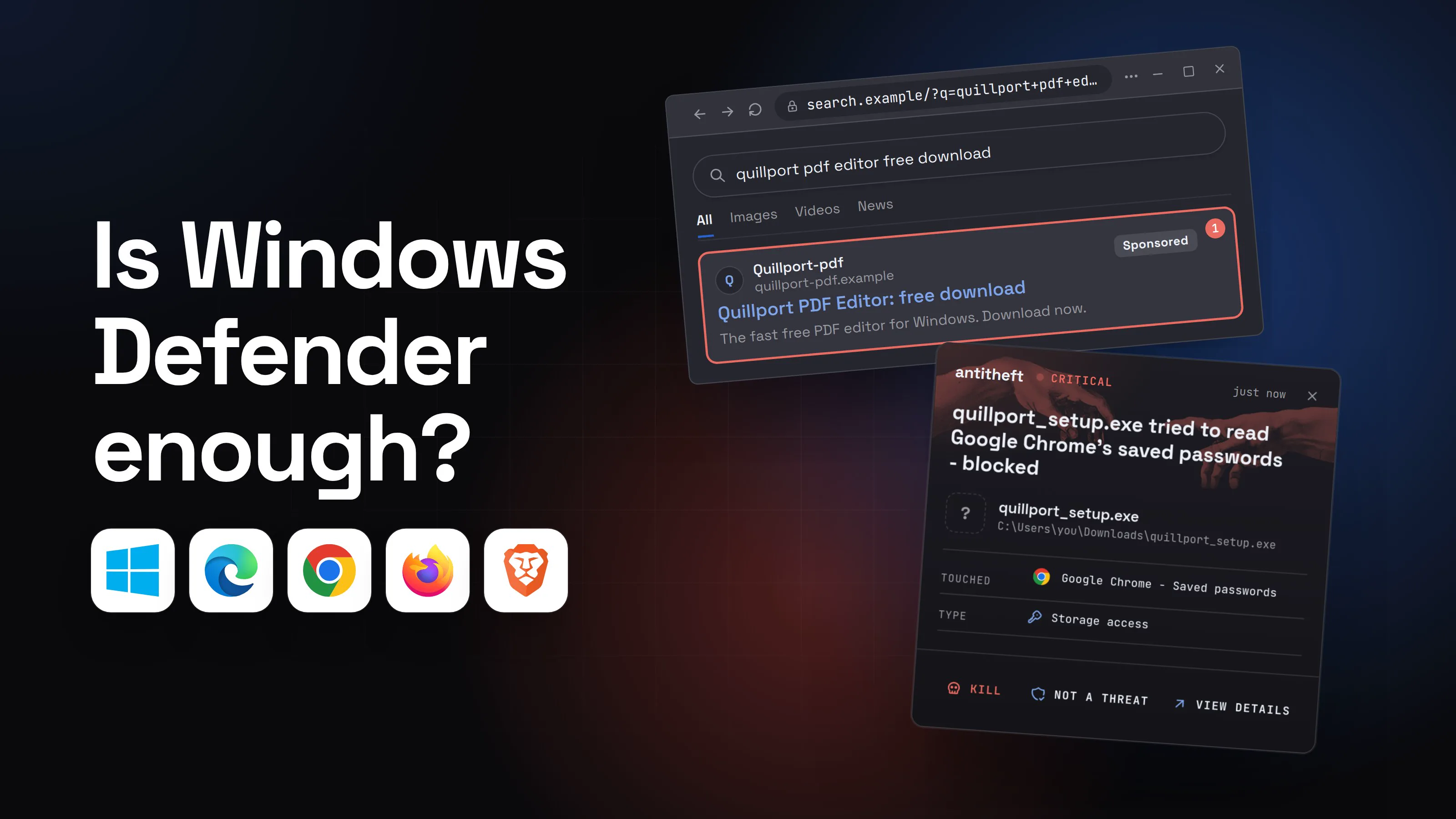
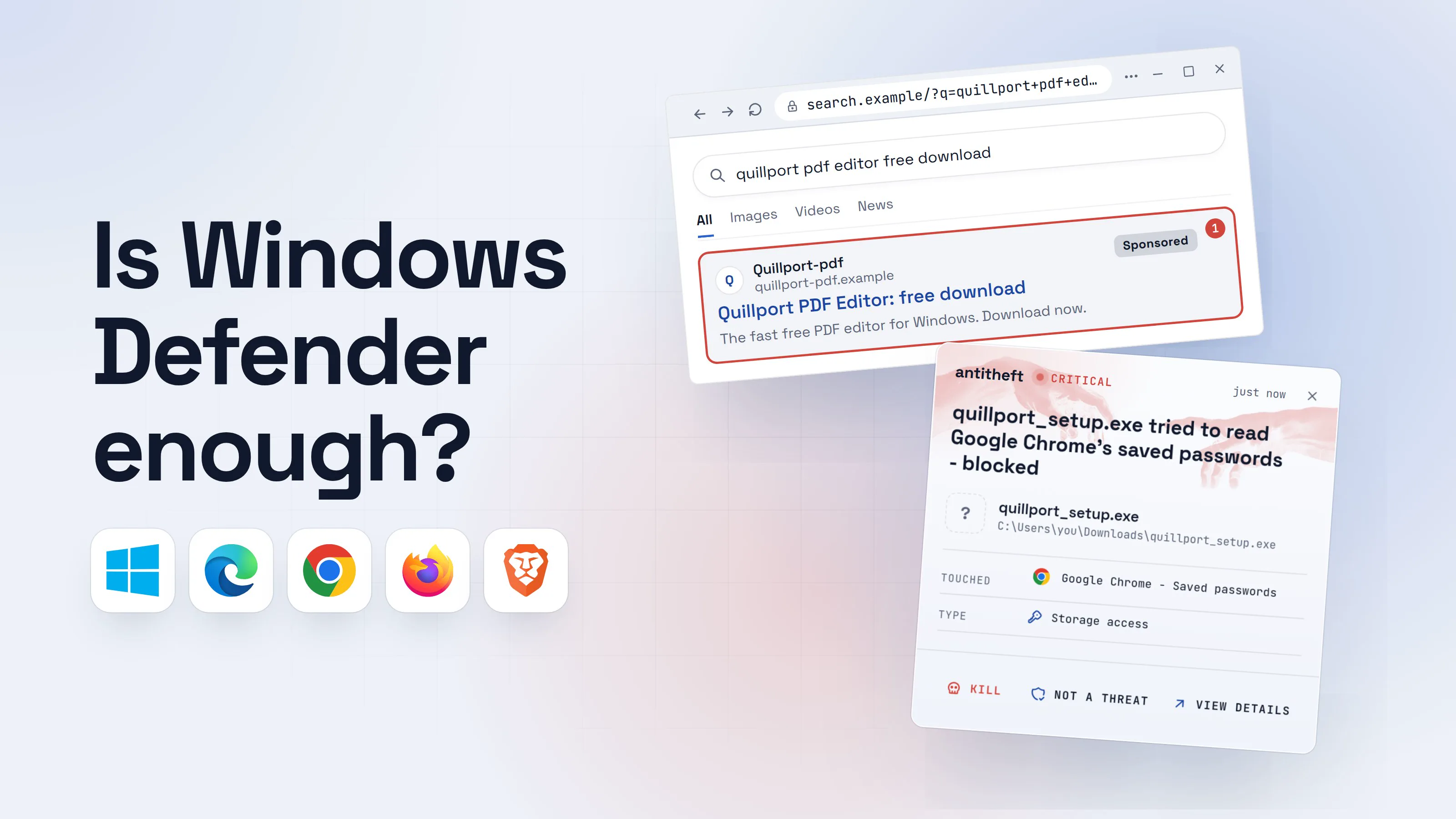
Here is the worst case in a picture: a download that every check lets through. It is not the usual outcome. Most of the time SmartScreen or Defender stops the program earlier, which is the point of keeping them on.
- 1A sponsored result offers a free downloadAnyone can buy the top spot. Criminals do, for popular free apps.quillport pdf editor free downloadAllImagesVideosNewsQuillport-pdfquillport-pdf.exampleSponsored1Quillport PDF Editor: free downloadThe fast free PDF editor for Windows. Download now.
- 1A paid ad. Nobody at Microsoft checked it
- 2Windows warns you, and you run it anywaySmartScreen is doing its job: this file has no reputation. The next click is yours.
Windows protected your PC
Microsoft Defender SmartScreen prevented an unrecognized app from starting. Running this app might put your PC at risk.
App: quillport_setup.exePublisher: Unknown publisher1Run anywayDon't run- 1No known maker, no history. The warning is the signal
- 3A scan finds no known threatNo threat found is not the same as safe: it can also mean not known yet.Security check (illustration)Close
- 1Too new for any list. Microsoft says its checks block most new threats, not all
- dangerIt opens your browser's saved passwordsIt does not break anything. It asks the way your browser does, as you.
What the program takes from your browser
- Saved passwordsEmail, bank, shops, socials
- Login cookiesSessions that skip the password
- Wallet filesCrypto accounts on this computer
Read in seconds, while you keep working.
With antitheft
With antitheft, the stealer is stopped at the browser's passwords
- Caught the moment it reaches for your passwords or wallets
- On Linux refused before the file opens, on Windows and macOS stopped right after
- Even the most advanced malware, the kind no antivirus has seen yet
- Touched
 Google Chrome - Saved passwords
- Type
- Storage access
Keep stealers out of your passwords and wallets
- Guards passwords, browser logins and wallets
- Stops malware your antivirus misses
- On Windows, macOS and Linux
That alert is not Defender's job and not a replacement for it. It is a second kind of check, taken up below. What the lock does not do is stop you typing a password into a phishing page, giving someone control of your computer, or typing a seed phrase into a fake site. For those, the habits in are browser saved passwords safe and the guides above are the answer.
When is a paid antivirus worth it?
A paid antivirus is worth it when you want what it adds beyond scanning, not because Defender scans badly. AV-Comparatives' own conclusion is that the answer depends on circumstances, and that it is more useful to think of layers than of Defender against everyone else.
Reasons people choose a paid suite, as AV-Comparatives lays them out:
- Extras Defender does not include, such as identity monitoring or a built-in VPN.
- Web protection across more apps. SmartScreen's web filtering is strongest in Edge and Outlook; third-party suites often filter in other browsers and mail apps too.
- A second engine and research team. AV-Comparatives argues that having more than one independent detection approach in the world reduces risk for everyone.
- Working offline. Defender leans on the cloud: 89.2% offline against 98.1% online in the March test.
Reasons not to: the 2026 tests above show small gaps between Defender and the paid products, the free one is already switched on, and you cannot run two real-time antivirus products. If you do buy one, Defender steps aside automatically, and the paid product is the one you must keep updated.
What closes the gap Windows Defender leaves?
A guard that does not depend on recognising anything. That is what antitheft is. It is not an antivirus: it does not scan your computer or remove anything, and it does not replace Defender. It works the other way round. Instead of asking "do I recognise this program?", it asks "is this the app that owns these passwords?"
On Windows, any program other than the app that owns your browser's saved passwords, logins and session cookies is stopped the moment it touches them, including a stealer nobody has seen before, because the rule is about who is asking, not about what the program is. That covers Chrome, Edge, Brave, Opera, Vivaldi and Firefox, and the same rule covers your desktop and browser-extension wallets. On Linux antitheft goes a step further and refuses such a program before the file even opens.
That is exactly the gap this article described: the 4 in 400, and the stealer too new to be known. Defender handles the known world. antitheft makes sure that when something unknown runs anyway and reaches for your passwords, cookies or wallets, it is stopped. It does not stop a password you type into a fake page, anything inside the browser itself, or a person you let into your computer.
antitheft's Activity view also shows you which programs opened your passwords, wallets and secrets such as SSH keys. Defender tells you what it recognised. antitheft shows you who actually went near what matters.
What if I think Defender missed something?
If your computer behaves oddly or an account was used by someone else, assume the first line was passed and work from a clean device.
- Run a full scan, then the offline scan. In Windows Security, Virus & threat protection, choose a Full scan, then Microsoft Defender Antivirus (offline scan).
- Change your passwords from another device, starting with your email. See what to do if your passwords were stolen.
- If a stealer ran, reinstall. A reinstall is the one step after which you know what is on the computer, and the only fix you can trust after a stealer.
So, is Windows Defender enough?
Not on its own. Keep Defender on, with Tamper Protection, cloud-delivered protection and SmartScreen switched on, install updates, and download only from the vendor's own site. Then run antitheft beside it, so that on the day something new gets past the scanner, the program that reaches for your browser passwords, cookies and wallets is still stopped. It runs on Windows, macOS and Linux and stops that program on each (on Linux before the file even opens), and it is not a second antivirus.
Questions people ask
Is Windows Defender good enough in 2026?
Not on its own. It is a good antivirus: in AV-TEST's May and June 2026 round it scored 6 of 6 for protection and earned the Top Product award, and in AV-Comparatives' February to May 2026 real-world test it blocked 396 of 400 threats with no false alarms. But an antivirus matches what is already known, 4 of 400 real-world cases still got through, and a stealer only needs one gap. Pair it with a guard that does not depend on recognition, such as antitheft, which stops any program other than the owning app the moment it touches your browser passwords.
Do I need antivirus on Windows 11?
You need one antivirus running, and Windows 11 already has one: Microsoft Defender Antivirus, switched on by default. The UK's NCSC says that if you make sure the built-in antivirus is switched on, you are instantly safer. You do not need to buy a second one, and Microsoft advises against running two real-time antivirus products at once.
Is Windows Defender better than paid antivirus like Norton, Bitdefender or Kaspersky?
In independent tests it sits in the same top group as the paid products, with small differences. In AV-Comparatives' real-world test Defender had 4 compromised cases out of 400, Kaspersky 1, Bitdefender 2 and Norton 3. Paid suites often add extras such as identity monitoring or a VPN, which AV-Comparatives notes Defender lacks. Whether those extras are worth paying for is your call.
Can I run Windows Defender and another antivirus together?
Not as two real-time antivirus products. Microsoft says that on Windows 11, when a non-Microsoft antivirus is installed as the primary one, Defender switches itself off, and it can switch back on if the other product expires or is removed. A tool that is not an antivirus, such as a password lock, can sit next to Defender.
Does Windows Defender protect against infostealers and hackers?
It blocks known infostealers, and Microsoft says its cloud checks block most new ones the first time they appear. Most is not all: a brand new stealer nobody has flagged yet can run, and some stealers now try to switch security software off. Defender does not stop a person you let into your computer or a password you type into a phishing page.
What is the best protection for Windows 11 besides Windows Defender?
Habits first: download from the vendor's own site, never paste commands from web pages, install updates, use two-factor authentication. Then a layer that does not depend on recognising malware. antitheft is one: on Windows it stops any program other than the browser the moment it touches the browser's saved passwords, logins and cookies. It is not an antivirus and does not replace Defender.
sources
- AV-TEST: Test antivirus software for Windows 11, June 2026 (Jun 2026)
- AV-TEST: Microsoft Defender Antivirus (Consumer) test results, August 2026 round (Aug 2026)
- AV-Comparatives: Real-World Protection Test, February to May 2026 (Jun 2026)
- AV-Comparatives: Malware Protection Test, March 2026 (Apr 2026)
- AV-Comparatives: Is Microsoft Defender enough? An independent view (May 2026)
- FTC: People reported losing $3.5 billion to imposter scams in 2025 (Jun 2026)
- FBI Internet Crime Complaint Center: 2025 IC3 Annual Report (tech support fraud) (Apr 2026)
- LastPass: Delphos report on the Rapuncel infostealer (Sep 2026)
- Elastic Security Labs: REVSTEALER ramps up (Sep 2026)
- Microsoft Security Blog: Infostealers without borders, macOS, Python stealers and platform abuse (Feb 2026)
- Microsoft Learn: Microsoft Defender SmartScreen overview (Apr 2026)
- Microsoft Learn: Microsoft Defender Antivirus compatibility with other security products (Aug 2026)
- Microsoft Learn: Cloud protection and sample submission at Microsoft Defender Antivirus
- Microsoft Learn: Configure cloud protection in Microsoft Defender Antivirus (Windows Security app steps)
- Microsoft Support: Prevent changes to security settings with Tamper Protection
- Microsoft Support: App & browser control in Windows Security
- Microsoft Support: Virus and threat protection in the Windows Security app
- Microsoft Support: Ransomware protection in Windows Security (controlled folder access)
- Microsoft Support: Antivirus and antimalware software FAQ
- UK NCSC: What is an antivirus product? Do I need one?
- CISA Secure Our World: Update software