Malicious PyPI packages: how to protect your pip installs
Malicious PyPI packages hit LiteLLM, Lightning and Flask typosquats in 2026. How a pip install turns into a stealer, and the flags and habits that stop it.
Malicious PyPI packages are packages on the Python Package Index that carry code meant to steal from the person who installs them. The code runs as you, the moment pip install builds the package, when Python starts, or the first time you import it. What it reaches for first is what pays: crypto wallets, password managers, logged-in sessions, and the cloud and GitHub keys on a developer's machine.
2026 changed the shape of the problem. The worst cases were not obscure fakes but hijacked releases of packages people already trusted: LiteLLM in March, PyTorch Lightning in April, Microsoft's durabletask in May. This guide covers how these packages get you, the recent cases, one walkthrough, and the exact flags and habits that protect your pip installs.
Is pip install safe? (what a malicious PyPI package can do)
pip install is as safe as the name you typed and the release you got. pip does not judge code: it fetches whatever the project's account uploaded and lets that package run code on your computer, with your permissions.
There are three moments when a package can run code:
- During the install. A source package (an "sdist") is built on your machine, which runs its
setup.pyor its build backend. Nothing asks you first. - Every time Python starts. A wheel can drop a
.pthfile intosite-packages, and Python runs the code in it on every launch, whether you import the package or not. - On import. Code in the package's
__init__.pyruns the first time your script imports it.
PyPI's own team handled more than 2,000 malware reports in 2025, most within a day. Fast removal helps, but a stealer needs only seconds on your machine.
How malicious Python packages get onto your computer
Five routes account for nearly every case in the last year:
- Typosquats. A name one letter off a favourite: in June 2026 GitLab found
rlaskandtlask(Flask),rsquests(Requests) andnhmpy(NumPy), published with version numbers copied from the real projects. - Install-time code.
setup.pyand build backends run duringpip install, which is why a source package from a stranger is riskier than a wheel. - Malicious wheels. Prebuilt wheels skip the build step, but can still ship a
.pthfile that runs on every Python start. - Hijacked maintainer accounts and tokens. The attacker publishes a new version of a real project with the real name. You did nothing wrong except update.
- AI-made-up names. An assistant "remembers" a library that does not exist. In August 2026 researchers found that half of the made-up names they flagged from local coding models were already registered on PyPI as lookalikes. This is called slopsquatting, and our guide to AI agent supply chain attacks shows how it reaches coding agents.
Malicious PyPI packages in 2026: the real cases
Each of these is from the researchers or PyPI themselves, with the date the bad versions went up:
- dYdX, February 6, 2026.
dydx-v4-client1.1.5post1, apparently published with the maintainers' own credentials, stole wallet seed phrases on first import and opened a remote-access backdoor (Socket). - LiteLLM, March 24, 2026. Versions 1.82.7 and 1.82.8 of the popular AI gateway were published with a token stolen through a compromised security scanner. Version 1.82.8 used a
.pthfile, so it ran whenever Python started. PyPI counted over 119,000 downloads in the 2 hours 32 minutes before quarantine. Telnyx followed on March 27 (Datadog). - PyTorch Lightning, April 30, 2026. Versions 2.6.2 and 2.6.3 ran a stealer on import, part of the Mini Shai-Hulud worm. It went after GitHub and npm tokens, cloud keys, Exodus, Atomic and Ledger wallets, and Discord and Slack sessions (Socket, Aikido).
- Microsoft durabletask, May 19, 2026. Three versions of a package with over 400,000 monthly downloads were uploaded with stolen publishing credentials, bypassing the project's own build pipeline. Targets included cloud keys and the 1Password and Bitwarden password managers (StepSecurity).
- Flask, Requests and NumPy typosquats, June 7, 2026. The four names above plus a poisoned
mflux-streamlit, built from the Shai-Hulud worm code its authors had made public in May (GitLab). - Hades, June 8, 2026. 28 compromised packages from the graph machine learning and bioinformatics world, including
ensmallen(StepSecurity). - Fake payment SDKs, July 7, 2026. Four
paysafe-*packages on PyPI that sent any environment variable named like a key, secret or token to the attacker (Socket).
The same worms run on npm too: our npm supply chain attack guide covers that side, and the supply chain attack overview ties every route together.
What a typosquat does after pip install
Here is the June 2026 pattern from your side of the screen. One wrong letter, an install that looks perfect, and a file that runs every time you use Python.
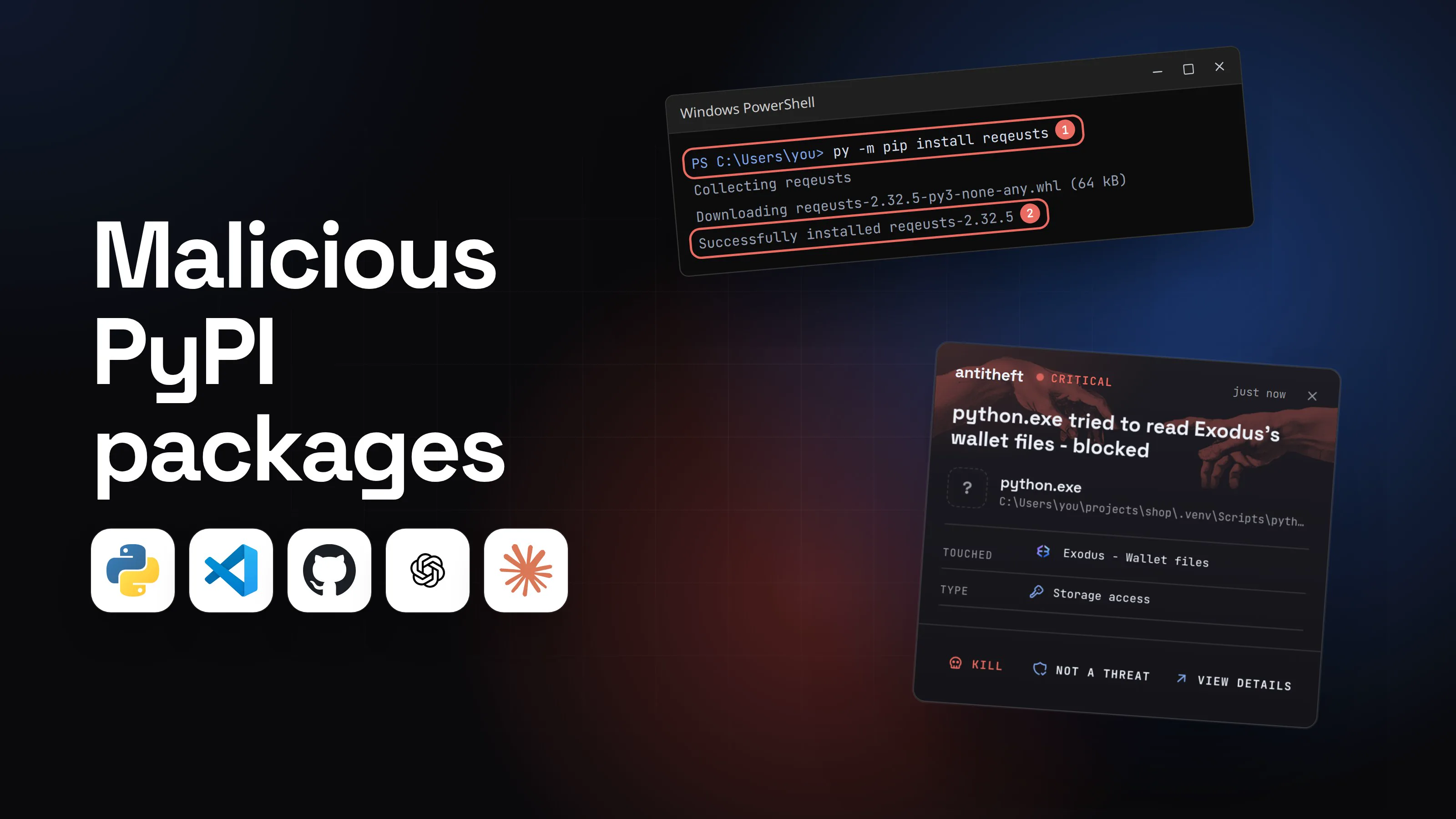
- 1You install a package and slip one letterA fast typo, or a name copied from a tutorial or an AI chat. pip installs whatever exists under that name.Windows PowerShell
PS C:\Users\you>you@MacBook ~ %you@laptop:~$py -m pip install reqeusts1
Collecting reqeusts
Downloading reqeusts-2.32.5-py3-none-any.whl (64 kB)
Successfully installed reqeusts-2.32.52
- 1reqeusts, not requests
- 2Same version number as the real project, to look normal
TerminalPS C:\Users\you>you@MacBook ~ %you@laptop:~$python3 -m pip install reqeusts1
Collecting reqeusts
Downloading reqeusts-2.32.5-py3-none-any.whl (64 kB)
Successfully installed reqeusts-2.32.52
- 1reqeusts, not requests
- 2Same version number as the real project, to look normal
- 2It drops a file Python runs on every startEven a wheel, which runs no setup.py, can carry one. You never import it..venv\Lib\site-packages
1requests/
2reqeusts/
3reqeusts-2.32.5.dist-info/
4reqeusts_init.pth1
- 1Python runs this line on every launch
.venv/lib/python3.13/site-packages1requests/
2reqeusts/
3reqeusts-2.32.5.dist-info/
4reqeusts_init.pth1
- 1Python runs this line on every launch
- 3You run your script as usualIt works. The payload started first, in the background.Windows PowerShell
PS C:\Users\you>you@MacBook ~ %you@laptop:~$py app.py
Fetched 120 orders, report saved1
- 1Nothing to see: the stealer runs in a separate background process
TerminalPS C:\Users\you>you@MacBook ~ %you@laptop:~$python3 app.py
Fetched 120 orders, report saved1
- 1Nothing to see: the stealer runs in a separate background process
- dangerThe stealer reaches for your wallets and your keysIt runs as you, so everything you can open, it can try to open.
What the poisoned package takes from you
- Your crypto walletsExodus, Atomic, Ledger: emptied for good
- Your password managerEvery other account in one place
- Your logged-in sessionsDiscord and Slack, open without a password
- Your cloud and API keysAWS, GitHub, PyPI tokens, .env files
Gone before your script prints its first line.
With antitheft
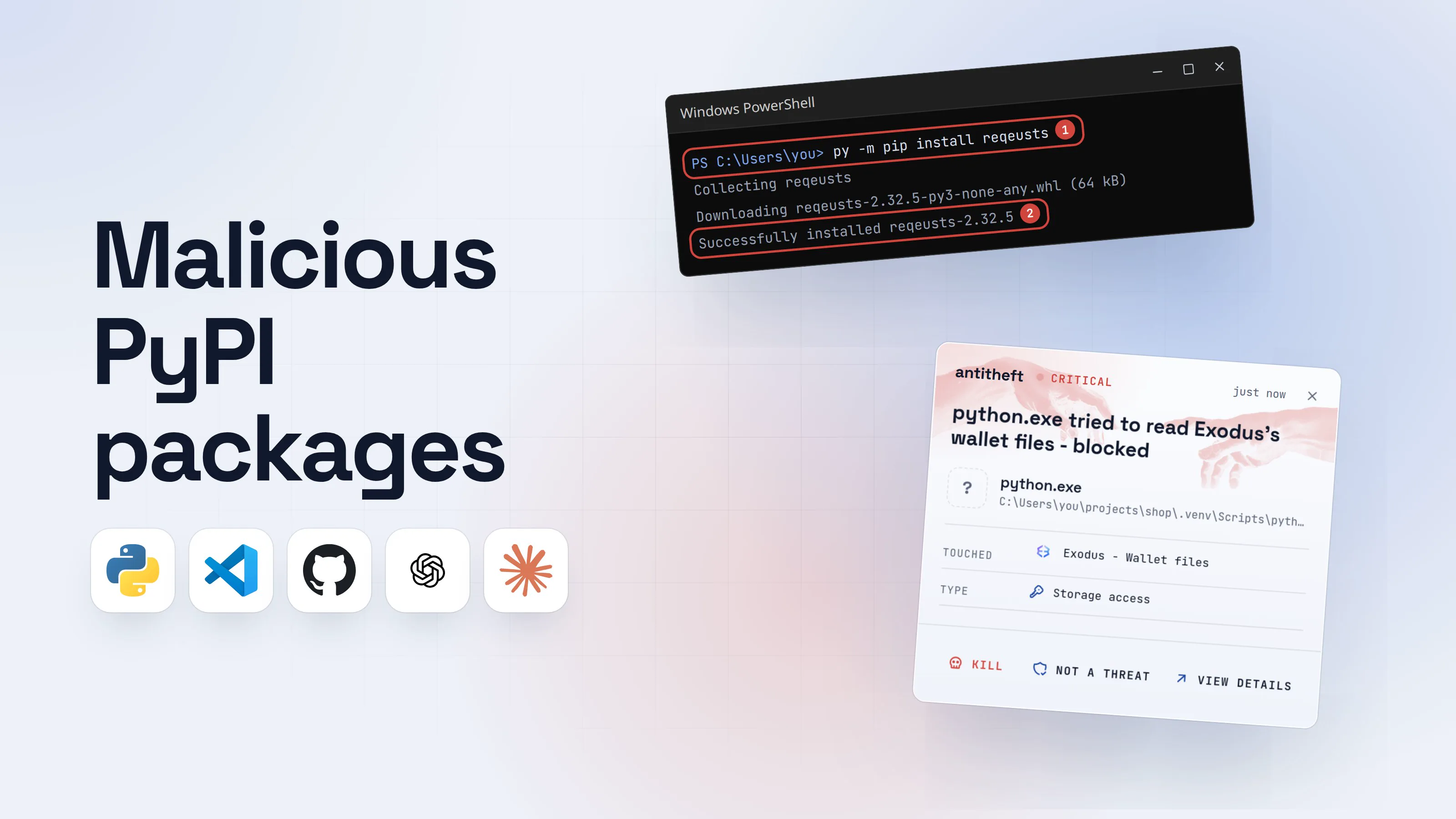
With antitheft, the stealer is stopped at your passwords
- Caught the moment it reaches for your passwords or wallets
- On Linux refused before the file opens, on Windows and macOS stopped right after
- Even the most advanced malware, the kind no antivirus has seen yet
- Touched
 Exodus - Wallet files
- Type
- Storage access
- Touched
- Exodus - Wallet files
- Type
- Storage access
- Touched
- Exodus - Wallet files
- Type
- Storage access
Keep stealers out of your passwords and wallets
- Guards passwords, browser logins and wallets
- Stops malware your antivirus misses
- On Windows, macOS and Linux
To your computer, that payload is just Python, started by you. antitheft works from a different rule: only Exodus may open Exodus's wallet, only your browser may open its saved passwords and session cookies. On Linux a script nobody has ever seen is refused all the same; on Windows and macOS antitheft stops it the moment it touches them. On Linux, what an install step starts is refused even when pip itself is allowed, and cannot add itself to the places that start with your computer.
How to protect against malicious PyPI packages
No single flag stops every route, so stack these. The first four cost nothing once set up.
- Use a virtual environment for every project. It keeps a bad package out of your system Python and makes cleanup a matter of deleting one folder. It is not a sandbox: code inside it still runs as you.
- Check every new name on pypi.org before you install it. Exact spelling, when the project was created, how many releases it has, who maintains it, and whether its repository is a real, active project. Do the same for names an AI assistant suggests.
- Install from a lock file with hashes.
uv lock,pip-compile --generate-hashesor Poetry's lock file pin every package to an exact file. PyPI's own advice: a lock file must include hashes, andpip freezeis not one. - Wait a few days before taking new versions. Hijacked releases are usually caught within hours: LiteLLM's were quarantined in under three hours, so a three-day cooldown would have skipped them entirely.
- Prefer wheels:
--only-binary :all:. pip then refuses source packages, so nosetup.pyruns during install. It does not stop.pthfiles or import-time code, so keep the other steps. - Never mix a private index with
--extra-index-url. pip's own docs call it unsafe: a public package with your private package's name can win. - Install unknown code in a container or VM with no wallet, browser profile or long-lived keys in it. Our guide on how to sandbox AI agents walks through each option.
- Keep money and real logins off the machine where you install packages all day, or on a separate user account.
For power usersThe commands, per system
- Create and enter a venv. Windows:
py -m venv .venv, then.venv\Scripts\activate. macOS and Linux:python3 -m venv .venv, thensource .venv/bin/activate. - Install pinned, hashed requirements. Windows:
py -m pip install --require-hashes -r requirements.txt. macOS and Linux:python3 -m pip install --require-hashes -r requirements.txt. Any--hashline in the file turns hash checking on by itself. - Make the hashed file:
pip-compile --generate-hashes requirements.in, or with uv:uv lockfor a project, thenuv sync. - Cooldown. pip 26.1 or newer:
--uploaded-prior-to P3Don the command line, oruploaded-prior-to = P3Dunder[install]inpip.conf(%APPDATA%\pip\pip.inion Windows). uv:exclude-newer = "P3D"(or"3 days") inuv.tomlor[tool.uv]. - Wheels only:
--only-binary :all:for pip,--no-buildfor uv. A package without a wheel then fails loudly instead of building. - Look before you trust:
py -m pip download NAME --no-deps --only-binary :all: -d check(orpython3 -m pip ...) fetches the file without installing it. Open the wheel as a zip and look for any.pthfile and for long encoded strings in__init__.py.
How maintainers keep their PyPI package from being hijacked
Most of 2026's damage came through real projects whose publishing credentials leaked. If you publish to PyPI, close that door:
- Switch to trusted publishing. Your CI gets a short-lived token per release instead of a long-lived API token that can be stolen. PyPI says more than 50,000 projects used it by the end of 2025. durabletask had no trusted publishing, which is how stolen credentials could upload straight to PyPI.
- Delete old API tokens once trusted publishing works.
- Turn on phishing-resistant 2FA on PyPI and on everything around it: GitHub, GitLab and your email.
- Lock down the release workflow. PyPI's guidance after LiteLLM: avoid
pull_request_target, pin actions to commit SHAs, and gate releases behind a GitHub Environment that needs a review.
PyPI itself added a guard in July 2026: a release older than 14 days no longer accepts new files, so a stolen token cannot quietly poison an old, trusted version.
What to do if you installed a malicious PyPI package
If a package you installed shows up in one of these reports, act as if a stealer ran. Do the account steps from a different, clean device.
- Disconnect the computer and stop any Python processes and editors on it.
- Move your crypto first. Create a new wallet on a clean device and send everything there.
- Change your important passwords, email first, and sign out of every session so stolen cookies stop working.
- Rotate every developer secret: PyPI, GitHub and npm tokens, SSH keys, cloud keys,
.envvalues and AI provider keys. Check GitHub for new repositories, workflows and commits you did not make. - Delete the virtual environment and rebuild it from a clean lock file pinned to a known good version.
- Look for what stayed behind: new systemd user services or files under
~/.configon Linux, LaunchAgents on macOS, scheduled tasks and Run keys on Windows. The LiteLLM payload installed a fakesysmonservice. - Reinstall the system before you trust the computer with money or work accounts again.
Rotating fixes what was taken. The harder part is knowing what was read at all: these payloads take your keys within seconds, and nothing on screen changes.
Questions people ask
Is pip install safe?
Installing a well-known package you spelled correctly, pinned to a version that has been out for a few days, is about as safe as installing software gets. The risk is in what pip install trusts: whatever name you typed, the newest version the maintainer's account uploaded, and any code that package runs while it installs or the next time Python starts. In 2026 hijacked releases of LiteLLM, Lightning and Microsoft's durabletask stole credentials from people who installed the right package name.
What is the best protection against malicious PyPI packages?
Layers, because no single flag covers everything. Use a virtual environment per project, install from a lock file with hashes (uv lock, pip-compile --generate-hashes or Poetry), wait a few days before taking new versions (--uploaded-prior-to P3D in pip, exclude-newer in uv), double-check every new name on pypi.org, and install unknown code in a container or VM. For what a payload reaches for once it runs, on Linux antitheft refuses any program that tries to open your browser passwords, logins, session cookies or crypto wallets, because only the app that owns them may open them; on Windows and macOS it stops the program the moment it touches them.
Does --only-binary :all: make pip install safe?
It closes one door: with --only-binary :all: pip refuses source packages, so no setup.py or build backend runs during the install. It does not stop code inside a wheel. The June 2026 Flask, Requests and NumPy typosquats and LiteLLM 1.82.8 used a .pth file that Python runs on every start, and Lightning and durabletask ran their payload on import.
How do I check if a PyPI package is safe before I install it?
Open its page on pypi.org yourself and check five things: the exact spelling against the project you meant, when the project was created and how many releases it has, who the maintainers are, whether the homepage and repository links point to a real, active project, and whether the newest release is only hours old. A name an AI assistant suggested deserves the same check: researchers in August 2026 found half of the package names local coding models made up were already registered on PyPI as lookalikes.
What should I do if I installed a malicious PyPI package?
Treat the machine as compromised. From a clean device, move your crypto to a new wallet, change your important passwords and sign out of every session, then rotate every key the machine held: PyPI, GitHub and npm tokens, SSH keys, cloud keys and .env values. Delete the virtual environment, look for startup items you did not add, and reinstall the system before you trust it again.
Does antitheft stop malicious PyPI packages?
No, it does not scan or block packages. It covers the moment that costs you money. On Linux, when any program, including a Python process a poisoned package started, tries to open your browser passwords, logins, session cookies or crypto wallets, it is refused, even when pip itself is allowed, and what an install step starts cannot add itself to the places that start with your computer. On Windows and macOS antitheft stops that program the moment it touches them. For your PyPI and GitHub tokens, SSH keys, cloud keys and .env files, antitheft's Activity view shows you which programs read them, so you know what to rotate after any scare.
the short version
Malicious PyPI packages are Python packages that run an attacker's code when you pip install or import them. They arrive as typosquats one letter off a popular name, as names an AI assistant made up, or as poisoned releases of real projects after a maintainer's account or publishing token is stolen. Install from a hashed lock file inside a virtual environment, wait a few days before taking new versions, check every new name on pypi.org, and rotate your keys after any scare.
sources
- PyPI Blog: Incident Report: LiteLLM/Telnyx supply-chain attacks, with guidance (Apr 2026)
- Datadog Security Labs: LiteLLM and Telnyx compromised on PyPI, tracing the TeamPCP supply chain campaign (Mar 2026)
- Socket: PyTorch Lightning PyPI package compromised in supply chain attack (Apr 2026)
- Aikido: Popular PyTorch Lightning package compromised by Mini Shai-Hulud (Apr 2026)
- StepSecurity: Microsoft's durabletask PyPI package compromised in supply chain attack (May 2026)
- GitLab: Shai-Hulud copycat campaign targets Python developers through PyPI typosquatting (Jun 2026)
- StepSecurity: The Hades campaign, graph ML PyPI packages deploy cross-platform memory scrapers (Jun 2026)
- Socket: Malicious dYdX packages published to npm and PyPI after maintainer compromise (Feb 2026)
- Socket: Coordinated npm and PyPI campaign typosquats popular secure payment apps (Jul 2026)
- Raj, Sahu: Names Can Hurt, spotting slopsquatting risks caused by package name hallucinations in local coding LLMs (arXiv 2608.23897) (Aug 2026)
- PyPI Blog: PyPI in 2025, a year in review (malware reports, trusted publishing adoption) (Dec 2025)
- PyPI Blog: Releases now reject new files after 14 days (Jul 2026)
- pip documentation: pip install (--only-binary, --require-hashes, --uploaded-prior-to, --extra-index-url warning)
- Python Packaging User Guide: Install packages in a virtual environment using pip and venv
- uv documentation: Settings reference (exclude-newer, no-build)
- PyPI Docs: Trusted Publishers